The Ultimate Guide to Apple Watch Kids Health Features by Age
Apple Watch Kids Health Features: What Works by Age
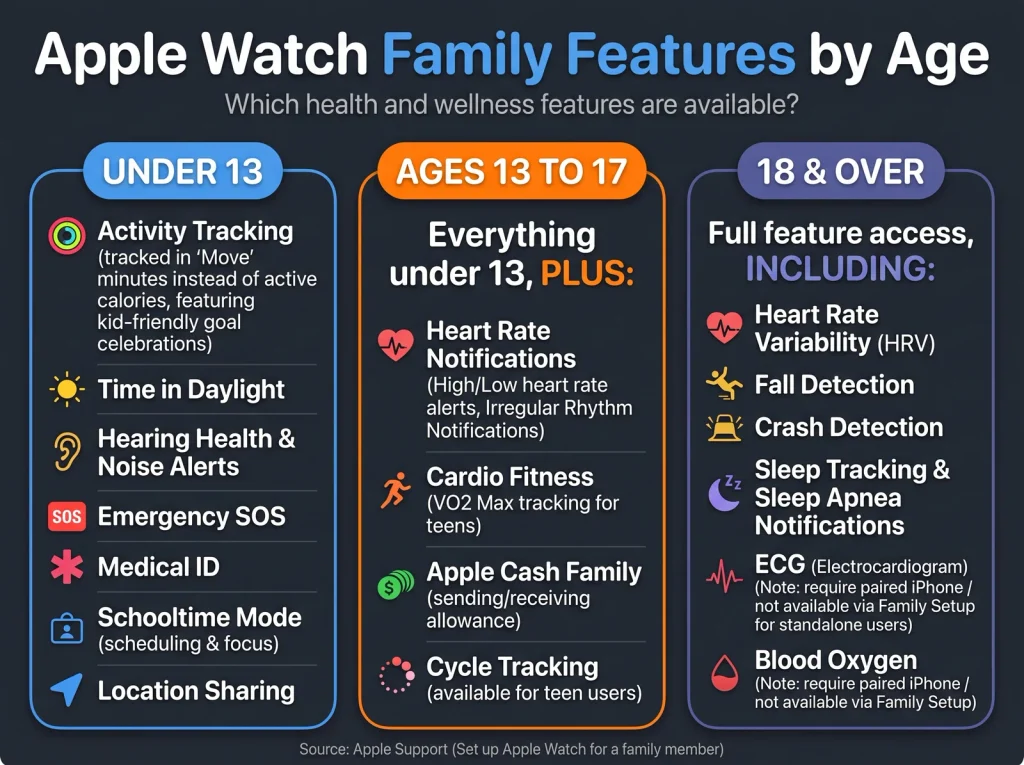
Apple Watch kids health features depend on the child’s age. Apple’s family-watch page lists high and low heart rate notifications from age 13, and Heart Rate Variability and Fall Detection from age 18. Children under 13 use move minutes for their Move goal in the Activity app.
Key takeaways
- Heart rate notifications for high and low rates are listed for users 13 and older. Heart Rate Variability and Fall Detection are listed for users 18 and older.
- Children under 13 use move minutes instead of active calories for their Move goal in the Activity app.
- Parents can see a child’s time in daylight through Health Sharing in the Health app.
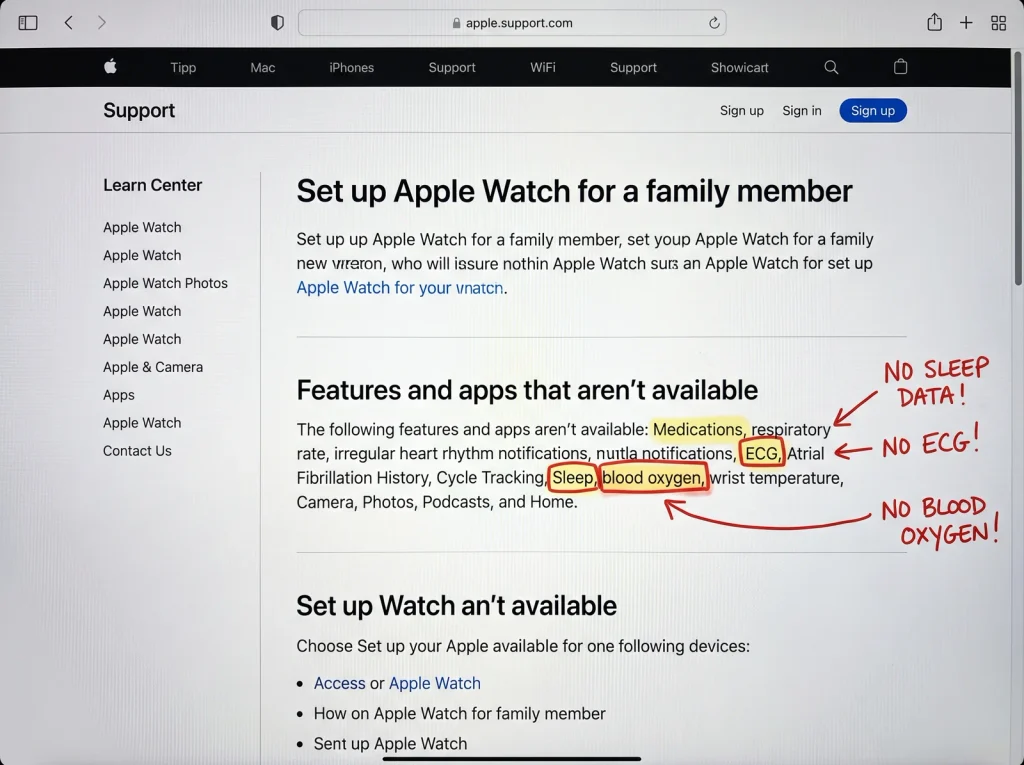
- Apple’s page lists many health features as unavailable on a family member’s watch, and a summary of it indicates ECG, Sleep, Blood Oxygen and Wrist Temperature are among them.
- Apple’s own pages disagree on which watch models qualify, so check the model before you buy.
What are the Apple Watch kids health features by age?
Apple says a cellular Apple Watch can be set up for a child even if the child has no iPhone of their own. The parent manages it from their own iPhone. Apple then limits several health features by age and lists others as unavailable.
The table below is built from Apple’s support page for setting up a watch for a family member, published on 14 September 2026. Each row stands on its own.
| Feature | Who gets it, per Apple’s page | Notes |
|---|---|---|
| High and low heart rate notifications | Users 13 and older | Separate page confirms the 13-and-up limit |
| Heart Rate Variability (HRV) | Users 18 and older | Not available to a younger child |
| Fall Detection | Users 18 and older | Separate page says adults only |
| Move minutes for the Move goal | Users under 13 | Used instead of active calories |
| Time in daylight | Viewable by parents | Through Health Sharing in the Health app |
| Apple Cash Family | Users under 18 | Apple’s page indicates United States only |
The age numbers in this table come straight from the family member setup page. We quote them as written and add no ages of our own.
How do the age gates work for children under 13?
Apple’s page lists no heart rate notifications, Heart Rate Variability or Fall Detection for children under 13. What it does list is a different way of counting activity.
Apple says users under 13 can use move minutes, rather than active calories, for their Move goal in the Activity app. Apple has not published its reasons on the pages we read. One plausible reading, and it is our inference only, is that minutes of movement suit children better than a calorie estimate. Treat that as opinion.
Apple’s page also says parents can view the amount of time children spend in daylight using Health Sharing in the Health app. This is the one health readout the page names for parents. It does not describe a menu path for it in the text we could read, so we give none.
What changes at 13?
At 13, Apple’s page lists high and low heart rate notifications. A separate Apple page on heart health notifications says the feature is available only on Apple Watch Series 1 or later for ages 13 and up. That page says the wearer chooses the limit: if the heart rate stays above or below a chosen beats-per-minute value, the watch can notify. Apple’s page says you can turn on heart rate notifications when you first open the Heart Rate app.
The practical meaning for a parent is narrow. A 13-year-old can get an alert when their heart rate sits above or below a threshold. Apple does not set that threshold for you on the page we read. Whether the family should set one is a question for the child’s doctor.
The heart health notifications page was published on 28 September 2026. We did not verify which settings screen a parent uses to change these limits on a child’s watch, so this guide gives no menu path for it.
What changes at 18?
Two features appear at 18: Heart Rate Variability and Fall Detection. Apple’s family page says HRV is available for users 18 and older and says the same for Fall Detection. Apple’s separate Fall Detection page, published on 6 May 2026, says Fall Detection is available only for those 18 or older.
This matters for parents who expect a child’s watch to react to a hard fall. If Apple’s pages are current, Fall Detection is not available to any child under 18, whether the child is 10 or 16.
Apple does not explain the 18 cutoff on the pages we read. We will not guess at the medical or legal reasons.
Which health features are not available at all?
Apple’s family page opens its list with the line “The following features and apps are not available:”. The items we could read in full are Medications, respiratory rate and irregular heart rhythm notifications.
The remainder of the list was only available to us as a summary of the page. It indicates the following are also unavailable: ECG, AFib History, Cycle Tracking, Sleep, Wrist Temperature, Blood Oxygen and Walking Steadiness. Non-health items on the same list include Audiobooks, News, Shortcuts, tap gestures and the wrist flick gesture, plus international roaming. Please confirm the full list on Apple’s page before you rely on any single item.
| Feature | Available on a child’s watch, per Apple’s page |
|---|---|
| Sleep | Listed as not available |
| Blood Oxygen | Listed as not available |
| Wrist Temperature | Listed as not available |
| ECG | Listed as not available |
| Medications | Listed as not available |
This table includes the most-asked items. It does not replace the full list.
The Sleep gap deserves a second look. Many families buy a watch for a child hoping to see bedtime patterns. A summary of Apple’s page indicates Sleep is not available on a family member’s watch, so that use case looks off the table as of the page’s September 2026 publication.
Which Apple Watch models can be set up for a child?
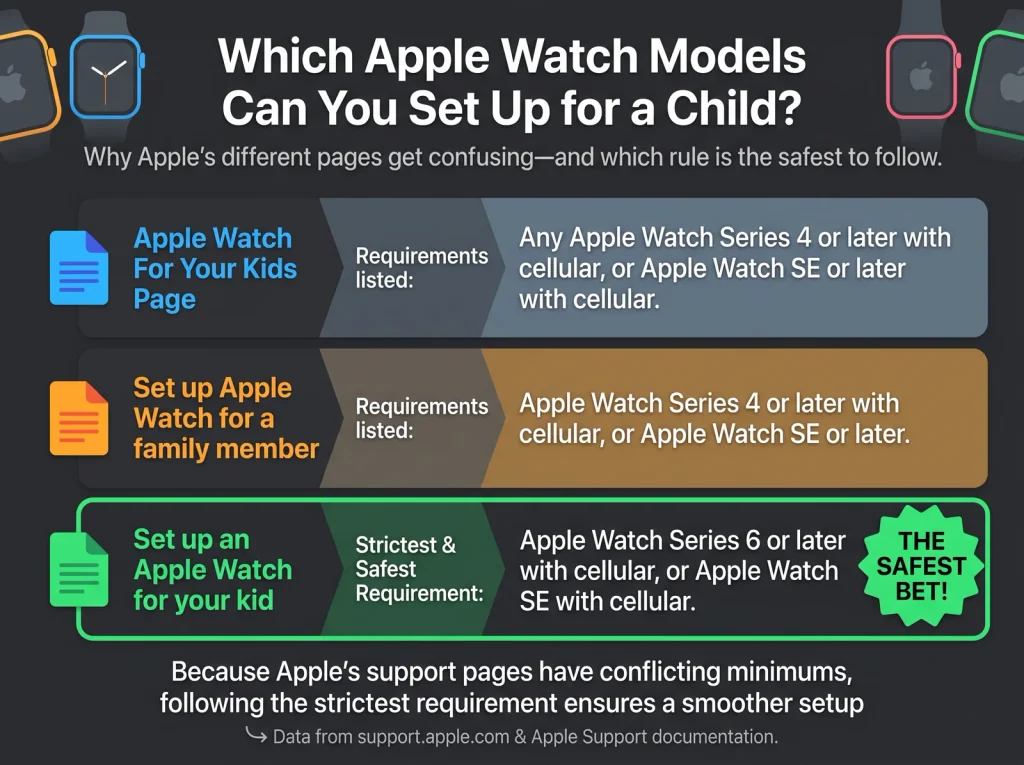
This is where Apple’s own pages disagree, and we will not pick a winner. Three Apple pages give three different answers.
| Apple page | What it says about watch models |
|---|---|
| Set up Apple Watch for a family member | Indicates Series 4 or later with cellular, or SE or later with cellular |
| Set up an Apple Watch for your kid (Child Safety guide) | Indicates a cellular-capable Apple Watch SE or Series 6 or later |
| Use Apple Watch For Your Kids (Apple Watch User Guide, watchOS 27) | Says the watch must be a cellular-capable Apple Watch SE 3 or Apple Watch Series 9 or later |
The third row is the strictest. It names watchOS 27 and quotes a model list that excludes older watches the first page would allow. The first two rows reached us as summaries of Apple’s pages, so treat them as what each page indicates, not as confirmed wording.
If you are buying new, the strictest reading is the safe one. In our reading, a watch that meets the third row also meets the other two. If you already own an older watch, check with Apple Support before you assume it will work. Apple’s family setup page is the place to start, and it indicates a cellular plan is not required for setup but is needed for some features.
Apple’s guide for kids and families says it covers what has changed with parental controls in iOS 27, iPadOS 27, macOS 27 and watchOS 27. The pages we read do not say those changes add any health feature to the lists above.
What can parents set during setup?
Apple’s family page lists optional setup features that include Messages in iCloud, Health Data and Emergency Contacts, alongside Medical ID. These are choices made during pairing on the parent’s iPhone.
Health Data is the one to read carefully. Apple’s page names it as a setup option but, in the text we could read, does not say what it shares or with whom. Apple’s child safety guide lists a topic titled “View your child’s health reports and information on Apple Watch”. We could not read what that topic says. Apple has not told us, on the pages we could read, what a child’s health report contains.
That is a gap worth knowing about before you buy. If health reporting is the reason you want the watch, open that guide topic yourself and confirm it covers what you need.
How should a parent decide, by age?
Here is how the Apple Watch kids health features should shape a purchase, by age. These suggestions are our own judgement, built on the age gates above.
- Under 13: buy the watch for calls, messages, location and Schooltime, not for health. The health layer is move minutes and daylight time.
- Ages 13 to 17: heart rate notifications become available, but Fall Detection and HRV do not. Do not count on the watch to detect a fall.
- Age 18 and over: Fall Detection and HRV become available, subject to the unavailable list.
- Any age: confirm the watch model against the strictest Apple page before you pay.
FAQ
Does a kid’s Apple Watch have Fall Detection?
No, not for anyone under 18. Apple’s family setup page lists Fall Detection for users 18 and older, and Apple’s Fall Detection page says it is available only for those 18 or older.
Can a child’s Apple Watch track heart rate?
From age 13, high and low heart rate notifications are listed on Apple’s family setup page. Apple’s heart health page says you choose the beats-per-minute limit. Apple’s pages we read do not list these notifications for children under 13.
Does a child’s Apple Watch track sleep?
No, according to a summary of Apple’s family setup page, which lists Sleep among the features and apps not available on a family member’s watch.
Can parents see their child’s health data?
Parents can see a child’s time in daylight through Health Sharing in the Health app, according to Apple. Apple’s pages we read do not describe a fuller health report, so check Apple’s child safety guide for details.
Verdict
An Apple Watch for a child is a communication and location device first. The Apple Watch kids health features are a thin layer on top. Under 13 the health layer is move minutes and daylight time. From 13 it adds heart rate notifications. Fall Detection and HRV wait until 18, and Apple’s list, as summarised, leaves out Sleep, Blood Oxygen and ECG.
Buy it for the right reasons. If you want calls, messages and Schooltime, it delivers. If you want fall alerts or sleep data for a child, Apple’s own pages say the watch will not provide them. Check the model requirement against the strictest Apple page, and read the child safety guide’s health topic before you buy.