ChatGPT vs Gemini iPhone Free: Limits, Privacy and Setup

ChatGPT vs Gemini iPhone Free: Limits, Privacy and Setup
Yes, you can use both without paying. In a ChatGPT vs Gemini iPhone free match-up, ChatGPT runs inside Apple Intelligence with no account, on Apple Intelligence iPhones only. Gemini is free through Google’s app or an API key in Shortcuts. Google may use free API text to improve its products. For private messages, pick ChatGPT.
Key takeaways
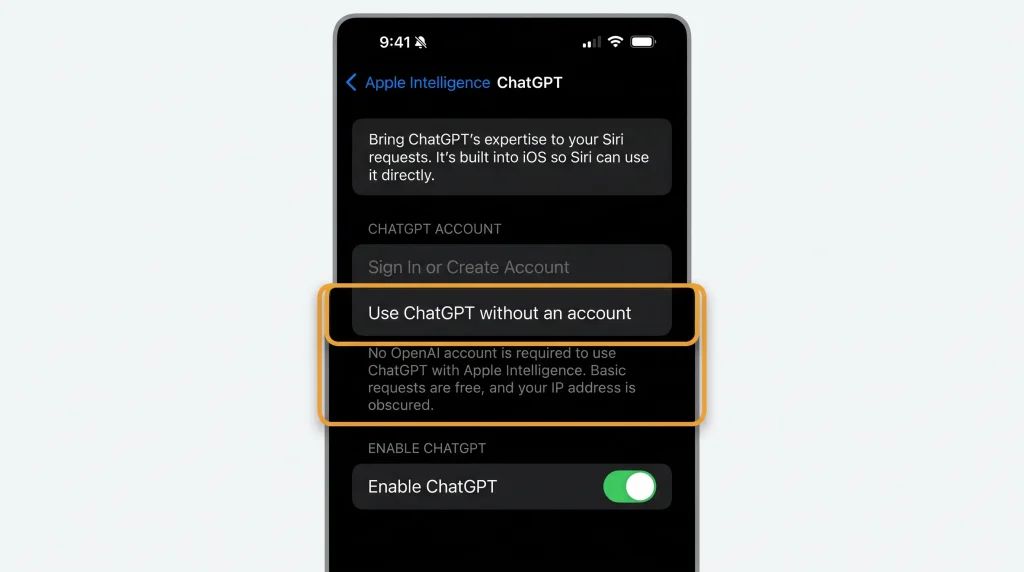
- The ChatGPT extension works without a ChatGPT account. You turn it on in Settings > Apple Intelligence & Siri > ChatGPT, according to OpenAI’s setup guide.
- Apple says your IP address is obscured from ChatGPT, and OpenAI must not store your requests unless the law requires it.
- The Gemini app is free, needs a Google Account and iOS 18.2 or later, and runs on Google’s Standard limits.
- A free Gemini API key works in Shortcuts, but Google says free-tier content is used to improve its products.
- ChatGPT inside Apple Intelligence needs an Apple Intelligence iPhone, such as iPhone 15 Pro, any iPhone 16 or later, iPhone Air or iPhone Duo, plus a supported device language. Serbian is not on Apple’s list.
What “free” means for each route
Any ChatGPT vs Gemini iPhone free plan comes down to three routes. None needs credits or a subscription, but each asks something different of you.
| Route | What you pay | What you give instead |
|---|---|---|
| ChatGPT extension in Apple Intelligence | Nothing; no ChatGPT account needed | Your request and attachments go to OpenAI each time you agree |
| Gemini app from Google | Nothing; paid Google AI plans are optional | A Google Account, plus data Google’s App Store label links to you |
| Gemini API key in a shortcut | Nothing on the Free Tier | Google may use free-tier content to improve its products |
Apple’s own on-device and Cloud models are a fourth option inside Shortcuts. They are not third-party AI, so this guide treats them as context only.
Route 1: ChatGPT inside Apple Intelligence
OpenAI documents this path; confirm the labels on an iOS 27 iPhone before publishing.
ChatGPT is built into iOS as an extension of Apple Intelligence. Apple’s privacy page names Siri, Writing Tools and visual intelligence as the features that can hand a request to ChatGPT. The summary of Apple’s iPhone User Guide page indicates the same pairing: deeper answers from Siri and text composed in Writing Tools once the extension is on.
How to use ChatGPT without an account on iPhone
OpenAI documents the setup like this:
- Open Settings > Apple Intelligence & Siri.
- Tap ChatGPT, then tap Set Up.
- Choose Use ChatGPT without an account, then tap Enable ChatGPT.
- To add an account later, go to Settings > Apple Intelligence & Siri > ChatGPT > Sign In.
OpenAI also says your Siri language and your device language must match, and both must be a supported language. That detail matters more than it looks, as the Serbia section below shows.
What the free extension sends, and what OpenAI keeps
In our reading, Apple’s ChatGPT extension privacy page is the clearest document on this. It lists what leaves your iPhone: your request, any attachments such as photos or documents, and limited data such as time zone, country, device type and language.
Three protections stand out:
- Apple says your IP address is obscured from ChatGPT.
- Apple says OpenAI must not store your information or the responses it gives, unless applicable law requires it.
- You are asked before anything is shared. Siri asks if you want to use ChatGPT, and OpenAI says Siri always asks before sending files.
Signing in changes the deal. Apple says your ChatGPT account settings and OpenAI’s own privacy policies then apply. OpenAI adds that saving chats to your history requires an account. In our reading, the no-account mode is the most private ChatGPT on an iPhone. It also keeps no history.
Does an account unlock more?
OpenAI says you can connect free and paid ChatGPT accounts, including Plus, Pro, Team, Enterprise and Edu. Its overview indicates that an account adds OpenAI’s most capable models. Signed-out use still covers questions, writing help and image or document analysis.
Where the usage limits sit
Neither of the two OpenAI setup pages we read publishes a daily limit for the free extension. Apple’s Shortcuts guide says usage limits may apply. It adds that server-side features carry daily limits that vary by feature, request complexity and demand. No number is published.
ChatGPT in Shortcuts with the Use Model action
The Use Model action in Shortcuts has four choices, according to Apple’s Shortcuts User Guide: On-Device, Cloud, Cloud Pro and Extension Model. Apple describes Extension Model as the option that “Uses ChatGPT to handle your requests.” That puts a free ChatGPT step inside your own automations, with no API key to manage.
Route 2: the free Gemini app
Google’s November 2024 announcement of the iPhone app called access “free of charge.” The App Store lists it as free, with Google’s AI plans as optional in-app purchases.
What the free Gemini plan includes
Google says the Gemini app uses compute-based limits. Without a paid plan you get “Standard limits,” which refresh every five hours until you reach a weekly cap. No-plan users get a 32k-token context window and image generation with Nano Banana 2. Google warns that limits may change without notice.
Requirements, from Google and the App Store:
- iOS 18.2 or later, so the app is not tied to Apple Intelligence hardware.
- A personal Google Account, or a work or school account with Gemini access.
- An age rating of 13+.
- A supported language, device and location. Google says the app may not be available everywhere.
What the Gemini app cannot do on iPhone
The App Store description says Gemini does not currently support iOS device actions such as setting alarms or sending texts. The Google help pages we read document no Siri or Shortcuts hooks for the app. Gemini Live, Google’s spoken conversation mode, does work on iPhone.
So the Gemini app is a separate assistant you open. ChatGPT sits inside Siri and Writing Tools.
Route 3: a free Gemini API key in Shortcuts
The third route puts Gemini inside a shortcut you can run from Siri, the Action button or the Share Sheet. Google says new accounts begin on the Free Tier, and AI Studio creates an API key for new users. Google’s pricing page lists Flash and Flash-Lite models such as Gemini 3.8 Flash as free of charge on that tier. Pro-class models are not available on it.
Build a free Gemini API key shortcut
OpenAI documents this path; confirm the labels on an iOS 27 iPhone before publishing.
Apple’s Shortcuts guide covers the action, and Google’s quickstart covers the request:
- In Google AI Studio, copy your key from the API keys page.
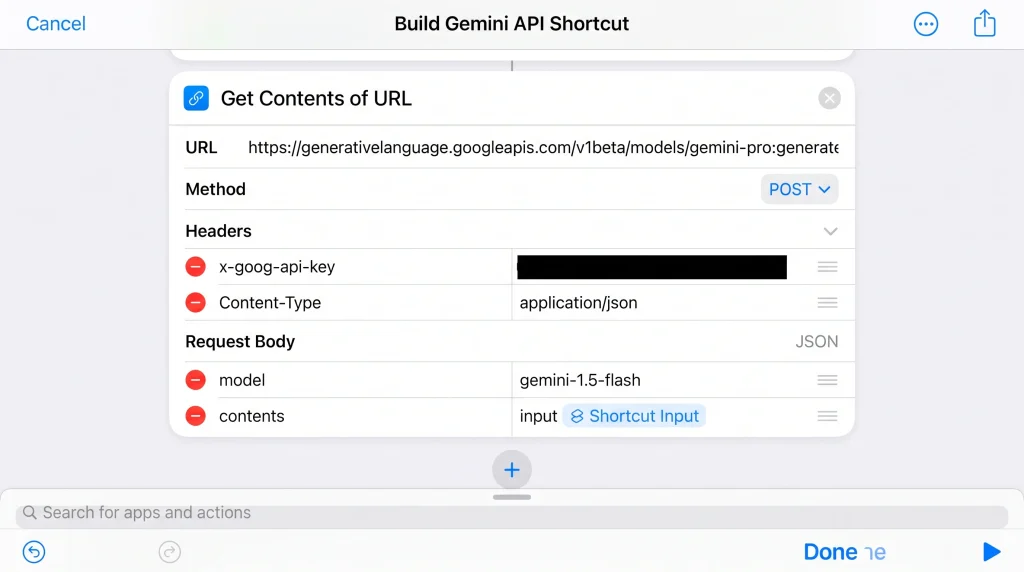
- In Shortcuts, add Get Contents of URL with the address https://generativelanguage.googleapis.com/v1beta/interactions.
- Tap Show More and set the method to POST.
- Add two headers: x-goog-api-key with your key, and Content-Type with application/json.
- Set Request Body to JSON and add two text fields: model set to gemini-3.8-flash, and input set to your prompt or the shortcut’s input.
- Add Get Dictionary Value for steps, then Get Item from List set to the last item.
- Add Get Dictionary Value for content, Get Item from List set to the first item, and Get Dictionary Value for text.
Steps 6 and 7 follow Google’s response format. The text sits in the model_output step, inside its content list. Google’s example puts a “thought” step first, so step 6 takes the last item. Apple’s guide does not document the header fields, so check their labels on your iPhone.
To run it, say the shortcut’s name to Siri, which reads the result back. On iPhone 15 Pro or later you can also assign it in Settings > Action Button. Turn on Show in Share Sheet in the shortcut’s Details to send selected text to it from other apps.
Keep your key out of shared shortcuts
As we read Apple’s guide, the key you type into the header stays inside the shortcut. If you share it, add an import question to the header field first. Apple says a field with an import question is cleared when the shortcut is shared, and the recipient enters their own value.
The privacy cost of the free API tier
Google’s pricing table says free-tier content is “used to improve our products,” while paid-tier content is not. Its billing page says a linked billing account keeps prompts and responses out of that use.
Our view: that rules the free API key out for anything personal. A family chat or a work email pasted into a free-tier shortcut goes into that pipeline. Use it for public text, menus, signs or drafting from scratch.
Google prints no free-tier request numbers. It says your limits appear in Google AI Studio, and daily quotas reset at midnight Pacific time.
ChatGPT vs Gemini iPhone free comparison
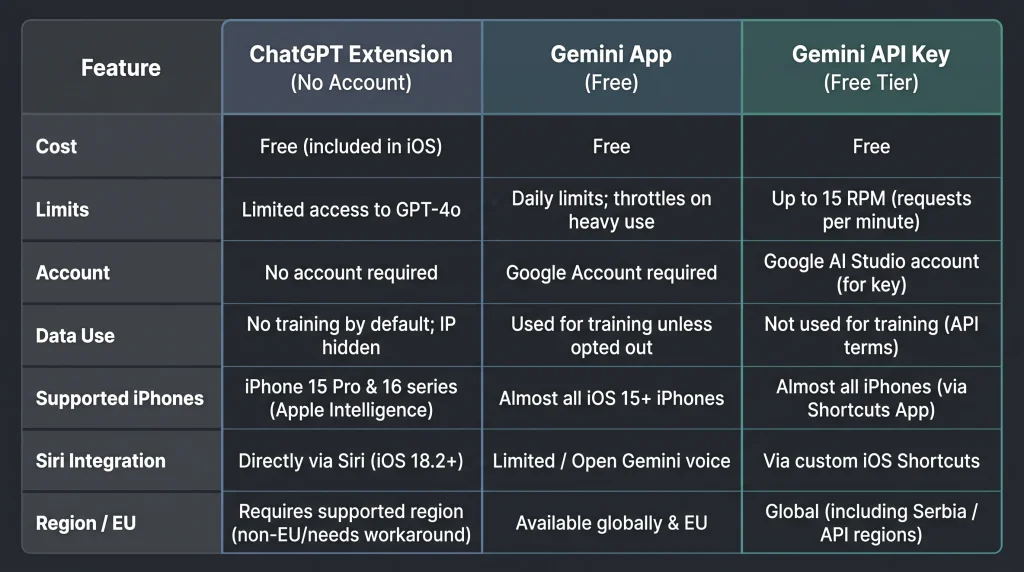
This table describes iOS 27 for the ChatGPT extension and iOS 18.2 or later for the Gemini app.
| ChatGPT extension (no account) | Gemini app (no plan) | Gemini API key in Shortcuts (Free Tier) | |
|---|---|---|---|
| Cost | Free, no ChatGPT account | Free; optional Google AI plans | Free on the Free Tier |
| Published limits | None published by OpenAI | Standard limits, refresh every 5 hours, weekly cap | Shown in Google AI Studio; daily quota resets midnight Pacific |
| Account needed | No | Google Account | Google Account for AI Studio |
| Data use | IP obscured; OpenAI must not store requests unless law requires | App Store label lists data linked to you | Content used to improve Google’s products |
| Supported iPhones | iPhone 15 Pro, iPhone 15 Pro Max, iPhone 16 models or later, iPhone Air, iPhone Duo | Any iPhone on iOS 18.2 or later | Any iPhone that runs Shortcuts |
| Setup effort | A few taps in Settings | Install and sign in | Build a six-action shortcut |
| Siri integration | Built into Siri and Writing Tools | None documented by Google | Run the shortcut by name with Siri |
| Serbia and EU | Needs a supported Apple Intelligence language and a ChatGPT region | Varies by location, per Google | Serbia, Croatia, Germany and France listed |
The “Any iPhone that runs Shortcuts” cell is our reading: the API route uses Get Contents of URL and no Apple Intelligence model.
Serbia and EU: which route works where
Apple’s Apple Intelligence availability page lists 16 supported languages, from English and German to Japanese and Korean. Serbian is not one of them. A reader in Belgrade must set both the device language and the Siri language to a supported one, such as English. OpenAI’s setup guide requires the two to match.
Apple adds that ChatGPT integration only works where the ChatGPT app and service are available. We could not read OpenAI’s country list in this check, so confirm your country there.
For EU readers, Apple says next-generation Apple Intelligence features reach EU users on iOS 27. Google’s Gemini API region list includes Serbia, Bosnia and Herzegovina, Montenegro, North Macedonia, Croatia, Slovenia, Albania, Kosovo, Germany and France. For the Gemini app, Google only says it may not be available in every location.
FAQ
Can I use ChatGPT on iPhone without an account?
Yes. In Settings, open Apple Intelligence & Siri, tap ChatGPT, tap Set Up and choose Use ChatGPT without an account. OpenAI says you need an account only to save chats to your ChatGPT history.
Is Gemini free on iPhone?
Yes. The Gemini app is free on the App Store, and Google described iPhone access as free of charge at launch. Free users get Google’s Standard limits, which refresh every five hours up to a weekly cap.
Does Apple send my data to OpenAI when I use ChatGPT through Siri?
Only when you agree. Apple says Siri asks before using ChatGPT, then sends your request, any attachments and limited data such as country and language. Apple says your IP address is obscured and OpenAI must not store the request unless the law requires it.
Is the free Gemini API key private?
Not for personal text. Google’s pricing page says free-tier content is used to improve Google’s products. Paid-tier content is not. Google says linking a billing account keeps your prompts and responses out of that use.
Can I put Gemini inside Siri instead of ChatGPT?
Apple’s pages we read name ChatGPT as the only extension. Today, Siri can run a Gemini API shortcut by its name and read back the result.
Verdict
For most people, the ChatGPT vs Gemini iPhone free question has a short answer. If your iPhone supports Apple Intelligence, turn on the ChatGPT extension without an account. It costs nothing, lives inside Siri and Writing Tools, and comes with the strongest written privacy terms of the three routes.
Pick the Gemini app if your iPhone is not on Apple’s Apple Intelligence list, or you want spoken Gemini Live. Keep the free Gemini API shortcut for public text and experiments, never for messages from real people. For private text in a shortcut, pay for a key.
Sources
- OpenAI: Setting up ChatGPT with Apple Intelligence — https://help.openai.com/en/articles/10269382
- OpenAI: What is Apple Intelligence? — https://help.openai.com/en/articles/10263313
- OpenAI: Setting up ChatGPT with Apple Intelligence (article 10263574) — https://help.openai.com/en/articles/10263574
- Apple: ChatGPT extension privacy — https://www.apple.com/legal/privacy/data/en/chatgpt-extension/
- Apple: Get started with the next generation of Apple Intelligence — https://support.apple.com/en-mt/121115
- Apple: Use Apple Intelligence in Shortcuts — https://support.apple.com/guide/shortcuts/tpg3vrvwmclv
- Google: The Gemini app is now available on iPhone — https://blog.google/intl/en-mena/product-updates/explore-get-answers/gemini-iphone-app/
- App Store: Google Gemini — https://apps.apple.com/np/app/google-gemini/id6477489729
- Google: Gemini Apps limits and feature availability — https://support.google.com/gemini/answer/16275805
- Google: Get started with the Gemini mobile app — https://support.google.com/gemini/answer/14554984
- Google: Gemini Developer API pricing — https://ai.google.dev/pricing
- Google: Gemini API billing — https://ai.google.dev/gemini-api/docs/billing
- Google: Gemini API rate limits — https://ai.google.dev/gemini-api/docs/rate-limits
- Google: Available regions for Google AI Studio and Gemini API — https://aistudio.google.com/docs/available-regions.md
- Google: Gemini API quickstart — https://ai.google.dev/tutorials/text_quickstart
- Google: Gemini API getting started — https://aistudio.google.com/docs/get-started?lang=node
- Apple: Request your first API in Shortcuts — https://support.apple.com/guide/shortcuts/apd58d46713f/ios
- Apple: Get Dictionary Value action — https://support.apple.com/guide/shortcuts/apdf01294032/ios
- Apple: Handling lists in Shortcuts — https://support.apple.com/guide/shortcuts/apd9ba41d21b/ios
- Apple: Run shortcuts with the Action button — https://support.apple.com/guide/shortcuts/apdfea15680b/ios
- Apple: Use Siri to run shortcuts — https://support.apple.com/guide/shortcuts/apd07c25bb38/ios
- Apple: Launch a shortcut from another app — https://support.apple.com/guide/shortcuts/apd163eb9f95/ios
- Apple: Add import questions to shared shortcuts — https://support.apple.com/guide/shortcuts/apdf330fd3a0/ios
- Apple: Turn on ChatGPT on iPhone — https://support.apple.com/guide/iphone/use-chatgpt-with-apple-intelligence-iph00fd3c8c2/ios
- Apple: Use Siri to get answers from ChatGPT on iPhone — https://support.apple.com/guide/iphone/iph0193a9d54/ios