Best Apps for iPhone Duo: 5 Proven, Amazing Apps
Best Apps for iPhone Duo: 5 Standout Apps to Try First
The best apps for iPhone Duo are the ones built for a specific pose. Our five standouts, all named by Apple, are Zoom and Microsoft Word when it is open, Prime Video when it is partly folded, Netflix when it is closed and Flighty when it is propped up. Apps nobody has updated are the biggest catch.
Key takeaways
- Our five picks are Zoom, Prime Video, Netflix, Flighty and Microsoft Word, which between them cover closed, open, partly folded and propped up.
- By our count, Apple’s developer announcement names more than 50 apps with iPhone Duo layouts, so these five are a starting point.
- Apps built with the iOS 26 SDK or earlier still run, but sit in the middle of the open display with empty space around them.
- On Apple’s own spec sheets, the trade-offs are Touch ID instead of Face ID, a 2x optical-quality zoom instead of 8x, shorter battery life than iPhone 18 Pro Max, and a $1,999 starting price.
- Siri AI is not initially available in the EU, so by our reading European buyers lose the Siri-beside-an-app feature at launch.
Our first impressions of iPhone Duo, from Apple’s own pages
CupertinoOS has not used an iPhone Duo. So these iPhone Duo first impressions come from what Apple ships and documents, read as a buyer would read a spec sheet.
The headline number is the screen. Apple says the 7.6-inch inner display is 50% larger than iPhone 18 Pro Max’s and calls it the largest display ever on iPhone. Closed, the 5.4-inch outer display gives you 90% of iPhone 18 Pro’s screen area, according to Apple’s announcement. Both displays share an aspect ratio, so apps scale between them.
iOS moves around, too. Apple shifts the Dock, Lock Screen controls and app navigation to the side, and the open display shows two Home Screen pages with Today View on the left. For the first time on iPhone, Split View puts two apps side by side, and you can save app pairs.
Our reading: iPhone Duo is a phone when closed and something close to a small tablet when open. The apps you choose decide which half you actually use, which is why we start with them.
The best apps for iPhone Duo: our 5 standouts
Apple’s developer pages show the device closed, folded like a tent, open wide, partially folded, open tall and folded like a laptop. We picked one app for each of the poses you will use daily, plus one for work. Every app here comes from Apple’s October 22 developer announcement.
| # | App | Pose | What Apple says it does |
|---|---|---|---|
| 1 | Zoom | Fully open | Turns the inner display into a video conference room |
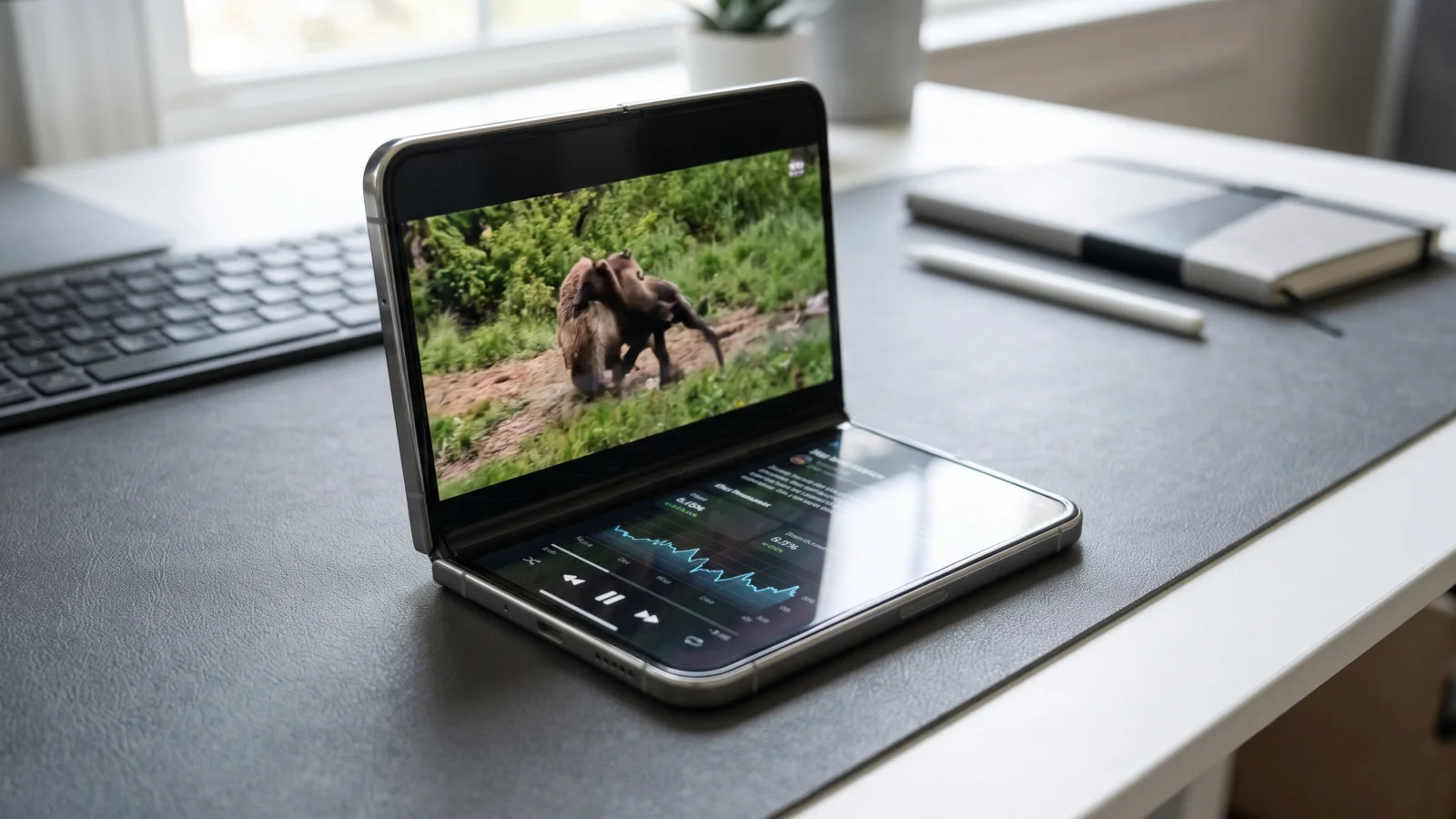
| 2 | Prime Video | Partially folded | Video on the top half, X-Ray cast and bonus details below |
| 3 | Netflix | Closed, then open | Browse Clips outside, keep watching inside |
| 4 | Flighty | Propped up | A dedicated flight-tracking mode |
| 5 | Microsoft Word | Fully open | Formatting tools beside the document |
1. Zoom: the inner display as a meeting room
Apple’s example for Zoom treats the open inner display as a video conference room. Shared content and participants sit on screen together.
Why it stands out: on a 6.9-inch iPhone 18 Pro Max, a shared slide and a grid of faces compete for space. On a 7.6-inch canvas they no longer have to. If your workday runs on calls, this is the single app most likely to justify the fold.
2. Prime Video: the partly folded pose done right
Set the phone partly folded on a table and Prime Video splits at the hinge. Video plays on the top half, with X-Ray cast and bonus details on the bottom half.
Why it stands out: the partly folded pose has no equivalent on a slab phone, and Prime Video gives each half a clear job. You get a stand and a second screen without a case or a tablet.
3. Netflix: from the outer display to the big screen
Netflix uses both screens in sequence. You browse Clips on the outer display, then open the phone to keep watching on the inner one.
Why it stands out: it shows the outer display as a front door rather than a cramped copy of the inner one.
4. Flighty: hands-free when propped up
Flighty offers a dedicated flight-tracking mode for when iPhone Duo is propped up.
Why it stands out: it is the clearest example of an app designed for the phone sitting on its own, rather than in your hand. Stand it on a tray table or a desk at the gate and, by our reading, the flight stays in view without a hand on the phone.
5. Microsoft Word: a document with its tools beside it
Apple’s example puts Word’s formatting tools alongside the document on the open display. Apple says Word and Outlook will roll out a desktop-class experience “in the coming weeks,” with Outlook showing an inbox next to a full message.
Why it stands out: Word is the test of whether iPhone Duo can replace a laptop for short jobs. Check for the update before you count on it, since Apple describes it as coming rather than shipped.
More apps Apple names for each pose
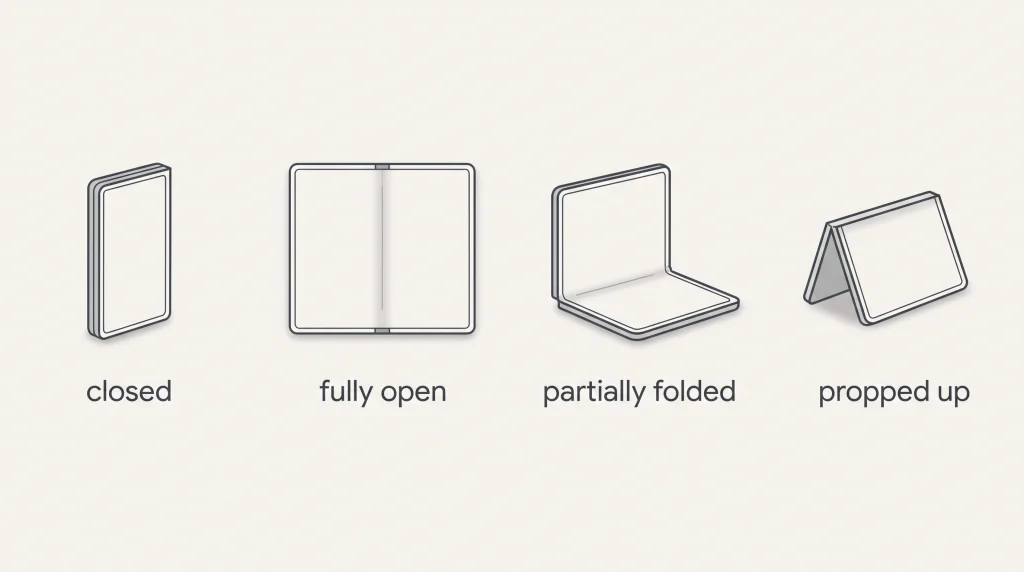
Beyond our five, Apple’s announcement names many more, and the source column says which Apple post each app comes from.
| Pose | What the pose is good for | More apps Apple names | Source |
|---|---|---|---|
| Closed | Quick checks, one-handed use | Tiimo (compact view), Sneaky Sasquatch, Retrocade, Deck-Man | Apple Newsroom, Oct 22 |
| Fully open | Two apps or one big canvas | Outlook, Slack, Fantastical, Instagram Edits, Detail, Asphalt Legends | Apple Newsroom, Oct 22 |
| Partially folded on a table | Watch on top, controls or data below | MLB, NYT Cooking | Apple Newsroom, Oct 22 |
| Propped up, hands-free | Timers, calls | Tiimo, FaceTime | Apple Newsroom, Oct 15 and Oct 22 |
MLB puts the game on the upright half and stats on the lower half. NYT Cooking shows more detailed recipes when the phone sits partly folded on a counter. Detail shows video and transcript side by side and runs AI models on device with the Core AI framework.
Apple’s built-in apps worth trying first
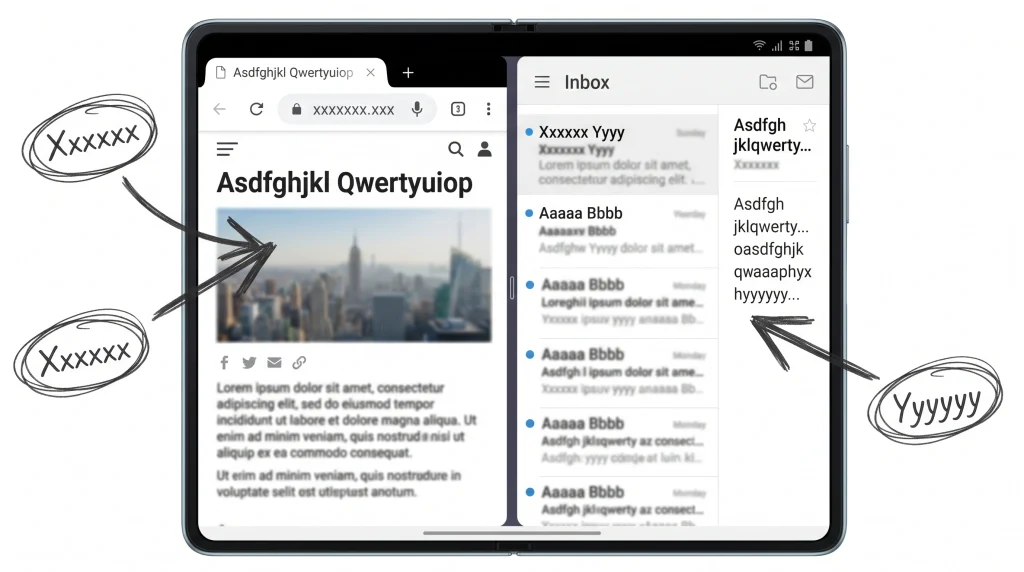
Split View is new to iPhone and lets you save the pair for next time.
Apple says its own apps are optimized for iPhone Duo. Three behaviours are worth testing on day one, all from Apple’s newsroom posts.
- Siri next to an app. Open flat, Siri can stay open beside an app and answer questions about what is onscreen. Apple’s example pairs Siri with Mail.
- Two Safari windows. Apple lists two windows of the same app, with Safari as the example.
- StandBy on either screen. Use it as a photo frame, widget hub or clock, with new Calendar and Weather faces, even when the phone is not charging.
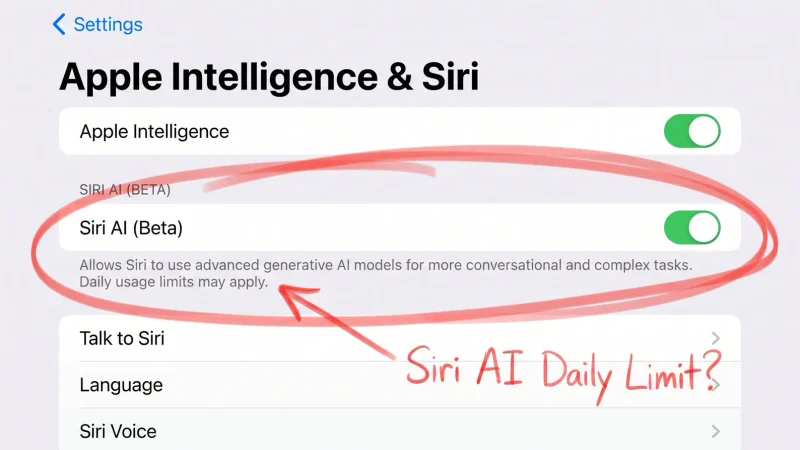
On Siri, one regional caveat applies. Apple’s Siri AI support page lists iPhone Duo among the supported iPhones, but Apple says Siri AI will not be available initially in the EU. It is also English-only to start and not available to users under 13.
iPhone Duo pros and cons at a glance
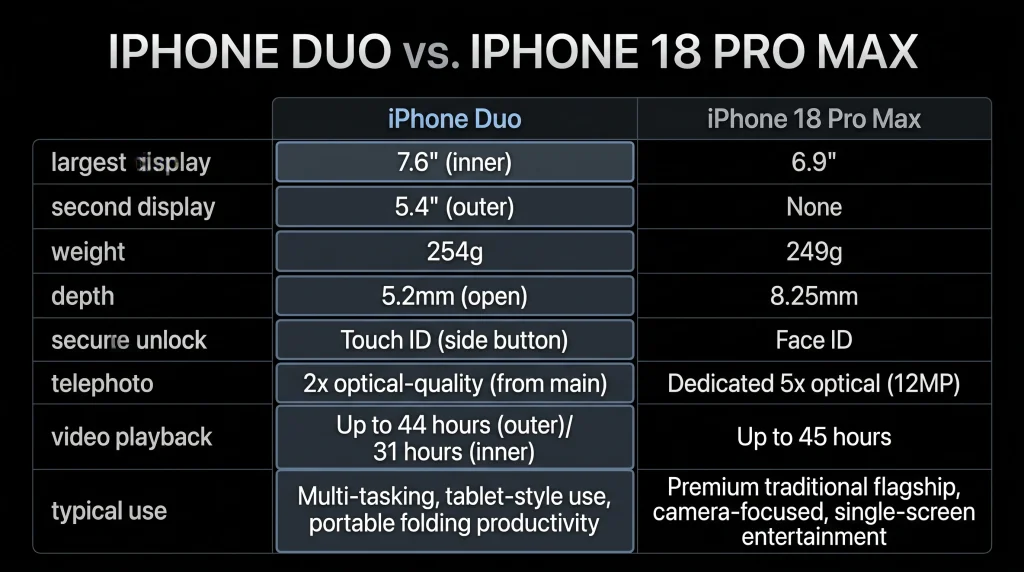
The fairest comparison is the phone Apple measures it against. Every figure below comes from Apple’s spec pages for each model.
| Spec (Apple’s wording) | iPhone Duo | iPhone 18 Pro Max |
|---|---|---|
| Largest display | 7.6-inch all-screen OLED folding display | 6.9-inch all-screen OLED display |
| Second display | 5.4-inch outer display | None |
| Weight | 254 g | 249 g |
| Depth | 5.2 mm open, 11.3 mm closed | 8.75 mm |
| Chip | A20 Pro | A20 Pro |
| Secure unlock | Touch ID in the side button | Face ID |
| Telephoto | Integrated optical-quality 2x Telephoto | 8x optical-quality telephoto |
| Video playback | Up to 31 hours inner, 44 hours outer | Up to 45 hours |
| Typical use | Up to 24 hours | Up to 30 hours |
| Starting storage | 256GB | 256GB |
The pros Apple documents
- Real multitasking. Split View, two windows of the same app such as Safari, and saved app pairs.
- Camera tricks the fold makes possible. You can take selfies with the rear cameras and preview them on the outer display. Apple’s Duo Preview shows your subject a live preview, and Kid Cue plays Peanuts animations to catch a child’s attention.
- Sustained speed. Apple quotes up to 35% better sustained performance than iPhone 17 Pro, helped by a custom vapor chamber.
The cons Apple’s own pages reveal
- No Face ID. Touch ID sits in the side button and works open or closed. Face ID is not listed.
- Shorter zoom. The 48MP Fusion Main camera handles 2x. The 8x telephoto stays on iPhone 18 Pro Max.
- Less battery. Apple lists up to 24 hours of typical use, against 30 hours on iPhone 18 Pro Max.
- Heavier. At 254 g, it is 5 g heavier than iPhone 18 Pro Max, which Apple lists at 249 g.
- Apple Pencil later. Apple says iPhone Duo will support Apple Pencil with USB-C later this year.
- Price. It starts at $1,999 in the US.
- No physical SIM. iPhone Duo is dual eSIM only and is not compatible with physical SIM cards.
What happens to iPhone Duo apps not optimized for the fold
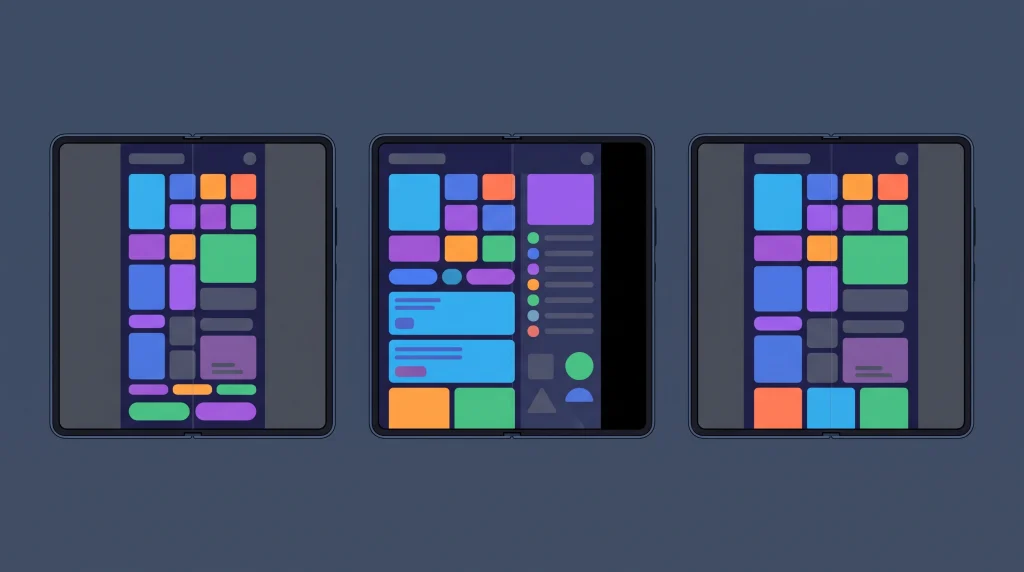
The SDK a developer builds with decides how much of the open screen an app can use.
This is the biggest practical con, and Apple spells it out on its developer page. On iPhone Duo, which comes with iOS 27.1, how an app behaves depends on the SDK its developer built it with.
| App built with | On the open inner display | Apple’s label |
|---|---|---|
| iOS 26 SDK or earlier | Runs in the centre, with empty space around the window | Won’t adapt to all layouts |
| iOS 27 SDK | Resizes to fill most of the display, avoiding the status bar on the right edge | Resizes dynamically |
| iOS 27.1 SDK or later | Extends across the full display, with toolbars and tab bars vertical below the status bar | Optimized for iPhone Duo |
Closed, an older app shows its content to the left of the status bar and camera. Apps that use Apple’s standard SwiftUI and UIKit components adapt on their own. Their controls move to the side, and buttons move away from the fold when the phone is partly folded.
The quickest check sits in the App Store. When a developer submits iPhone Duo screenshots, the product page shows a badge saying the app is optimized for iPhone Duo. If your daily apps lack it, expect letterboxing on the big screen.
Is iPhone Duo worth it for buyers in Europe?
Availability is not the problem. Apple lists France, Germany and the UK among the first countries on October 23, with 28 more on October 30.
The software is. Apple presents Siri answering questions about an app beside it as part of Siri AI, and Siri AI will not be available initially in the EU. By our reading, EU buyers lose that open-display feature at launch. All five of our standout apps are third-party, so the case for an EU buyer rests on them, Split View and the partly folded pose.
FAQ
What are the best apps for iPhone Duo right now?
Our five standouts are Zoom, Prime Video, Netflix, Flighty and Microsoft Word, all named by Apple for iPhone Duo. Between them they cover every everyday pose, from the closed outer display to the phone propped up on a table.
Do all iPhone apps work on iPhone Duo?
Yes, but not equally well. Apple says apps built with the iOS 26 SDK or earlier run on iPhone Duo without adapting to all layouts. On the open display they sit in the centre with empty space around them.
Does iPhone Duo have Face ID?
No. Apple’s iPhone Duo spec sheet lists Touch ID built into the side button, and Apple says it works whether the phone is open or closed.
Can you use two apps at once on iPhone Duo?
Yes. Split View on iPhone Duo opens two apps side by side, the first time on iPhone. Apple also lists two windows of the same app, such as Safari, and saved app pairs.
How do I know if an app is optimized for iPhone Duo?
Look at its App Store product page. Apple says that when a developer submits iPhone Duo screenshots, the product page shows a badge saying the app is optimized for iPhone Duo.
Bottom line
Start with Zoom and Prime Video. They show off the two things no slab phone can do: a big open canvas and a screen split at the fold. If those two would change your day, the extra screen pays off.
If you mostly zoom photos, rely on Face ID or live in the EU waiting for Siri AI, iPhone 18 Pro Max is the better buy at a lower risk. Our view: the best apps for iPhone Duo are good enough to justify it for heavy multitaskers, and not yet for anyone else.
Before you order, open the App Store on your current iPhone and look up your five most-used apps. If they carry the iPhone Duo badge, you are ready.
Sources
- Apple Newsroom: Apple unveils iPhone Duo. https://www.apple.com/newsroom/2026/09/apple-unveils-iphone-duo/
- Apple Newsroom: Open up to new possibilities with iPhone Duo. https://www.apple.com/newsroom/2026/10/open-up-to-new-possibilities-with-iphone-duo/
- Apple Newsroom: Developers bring incredible new app experiences to iPhone Duo. https://www.apple.com/newsroom/2026/10/developers-bring-incredible-new-app-experiences-to-iphone-duo/
- Apple: iPhone Duo Technical Specifications. https://www.apple.com/iphone-duo/specs/
- Apple Support: iPhone Duo Tech Specs. https://support.apple.com/en-us/148588
- Apple Support: iPhone 18 Pro Max Tech Specs. https://support.apple.com/en-us/148591
- Apple Support: How to get Siri AI. https://support.apple.com/en-us/127893
- Apple Developer: Prepare your app for iPhone Duo. https://developer.apple.com/iphone-duo/prepare/
- Apple Developer: Preparing your app for iPhone Duo. https://developer.apple.com/documentation/technologyoverviews/preparing-your-app-for-iphone-duo