How to Set Up Claude Daily Auto-Replies on iPhone
Claude API iPhone Shortcut: Set Up Daily Replies Safely
A Claude API iPhone shortcut sends your text to Anthropic’s Messages API with the Get Contents of URL action, then hands the reply back to you. You need a Console API key, three request headers and a short JSON body. If you only want to chat, the official Claude app needs no code at all.
Key takeaways
- Anthropic’s API lives at https://api.anthropic.com, and every Messages request needs an auth header, anthropic-version and content-type: application/json.
- The newest API version is 2026-10-21. It removes temperature, top_p and top_k, so a request that still sends them gets a 400 error.
- Max and Team plans include monthly API credits. Free, Pro and Enterprise plans are not eligible, so Pro users pay for API usage separately.
- The Console shows a new key only once, and an import question clears a field when you share a shortcut, which keeps the key out of copies.
Claude app vs API on iPhone: which one do you need?
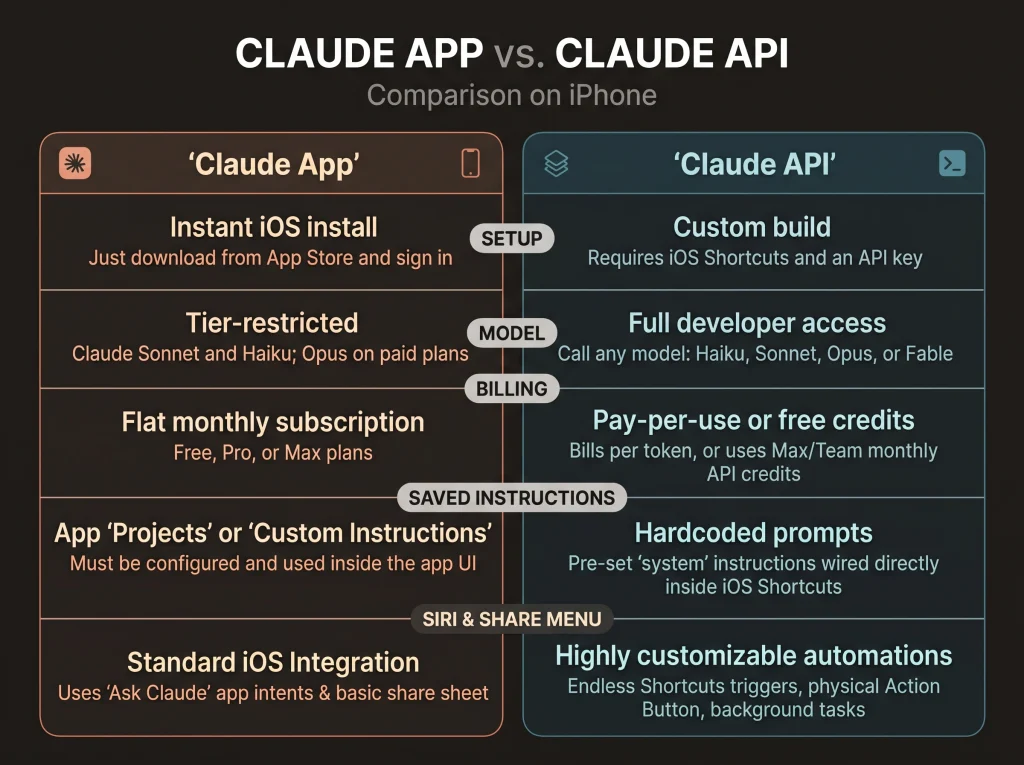
Anthropic’s support guide says the Claude iPhone app already offers an Ask Claude action in Shortcuts, an Ask Claude intent for Siri, Spotlight and the Share menu, a Home Screen widget, and an Analyze Photo with Claude control. Those features need iOS 18 or later.
| What you want | Claude app (Ask Claude) | Your own API shortcut |
|---|---|---|
| Setup effort | Install the Claude app | Console account, API key, one shortcut |
| Which model answers | The default model shown in the app | The model ID you put in the request |
| How it is paid for | Counts toward your Claude plan’s usage limit | Billed per token through the Console, or Max and Team monthly API credits |
| Saved instructions | Possible by chaining Ask Claude inside your own shortcut | A system prompt in the request body |
| Works from Siri and the Share menu | Yes, through the Ask Claude intent | Yes, once the shortcut is set up for them |
Our view: the app suits open-ended questions. The API route earns its setup time when you repeat one job many times a day, such as “translate this to English,” and want a fixed model, a system prompt and per-token billing.
What you need before you build
You need a Claude Console account. Anthropic’s key guide sends you to the API keys page at platform.claude.com/settings/keys. There you click Create key, name it, pick an expiration and choose who it is linked to.
The key starts with sk-ant-. The Console shows the full key only once, at creation. If you lose it, you cannot view it again and must create a new one.
Billing decides whether this costs you anything. Anthropic’s API credits page for subscribers lists which plans include monthly API credits:
| Claude plan | Monthly API credit | Notes from Anthropic’s page |
|---|---|---|
| Free, Pro, Enterprise | None | Not eligible |
| Max 5x | $100 USD | Claim on claude.ai under Settings > Billing |
| Max 20x | $200 USD | Claim on claude.ai under Settings > Billing |
| Team, Standard seat | $20 USD per seat | Seats pool into one balance, capped at $500 USD |
| Team, Premium seat | $100 USD per seat | Seats pool into one balance, capped at $500 USD |
New subscribers can claim after 7 days on an eligible plan. Unused credits expire at the end of each billing cycle and do not roll over. With no credits left, API requests stop until the next monthly credits arrive. Anthropic says usage is never charged to your Claude plan.
How to build a Claude API iPhone shortcut, step by step
Apple’s guide Request your first API in Shortcuts covers the action this build depends on. The steps below map Anthropic’s request format onto it.
Step 1: Create the key and keep it out of notes
- In the Claude Console, open the API keys page and click Create key.
- Give the key a name that says where it lives, such as “iPhone shortcut”.
- Choose an expiration, then copy the key the one time the Console shows it.
- Paste it straight into the shortcut in Step 2 rather than into a note or a message to yourself.
Step 2: Point Get Contents of URL at the Messages endpoint
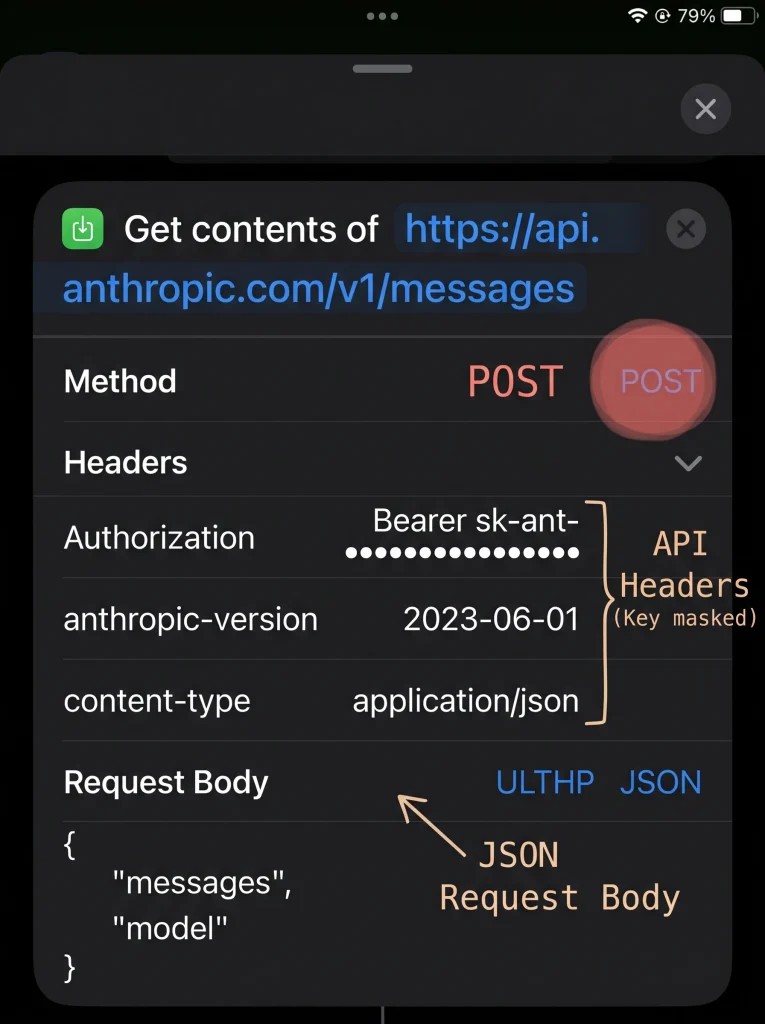
- In the Shortcuts app, create a new shortcut and add a URL action with https://api.anthropic.com/v1/messages.
- Add the Get Contents of URL action and tap Show More.
- Set the method to POST. Apple’s guide lists GET, POST, PUT, PATCH and DELETE.
- Add Anthropic’s three headers: Authorization with the value Bearer followed by a space and your key, anthropic-version with 2026-10-21, and content-type with application/json.
Apple’s page documents the method and the Request Body but does not describe the header fields. Our reading is that they sit in the same Show More panel; check the label on your screen.
Anthropic still accepts x-api-key as a legacy fallback for Authorization. Older tutorials pair it with anthropic-version: 2023-06-01, a version Anthropic still lists. Anthropic recommends the latest one.
Step 3: Build the JSON request body
Apple says that once the method is POST, a Request Body parameter appears that can send JSON, a Form or a File. Choose JSON and add these fields, which match the body Anthropic’s reference shows:
- model: a model ID from Anthropic’s models page, such as claude-haiku-5-5.
- max_tokens: the most tokens Claude may generate, such as 1024.
- system: your fixed instructions as a plain string.
- messages: a list with one item that has role set to user and content set to your text.
Do not add temperature. Under version 2026-10-21, a request that sends it returns a 400 error on every model.
Step 4: Pull the reply text out of the response
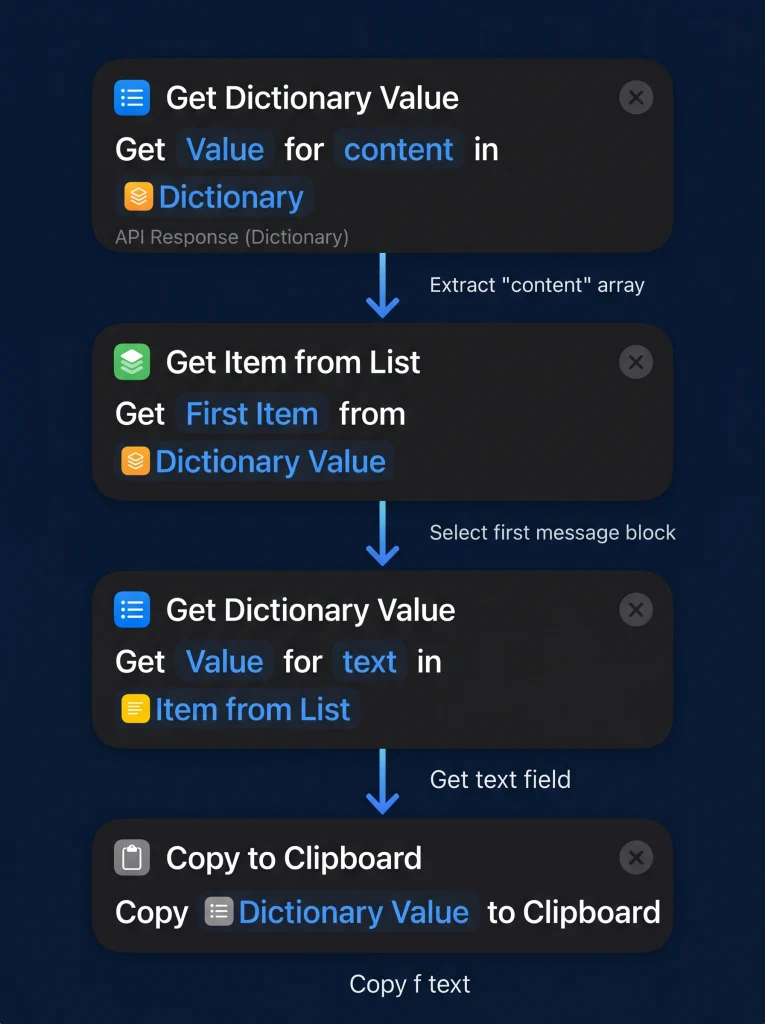
The API returns a Message object whose content field is a list of blocks. In Anthropic’s example, the reply text sits in the first block’s text field.
- Add Get Dictionary Value and set its key to content.
- Add Get Item from List to take the first item, as Apple’s lists guide does after an API call.
- Add a second Get Dictionary Value with the key text.
- Finish with Copy to Clipboard, so the reply is ready to paste.
Apple’s dictionary guide also allows dot notation for nested values, which can shorten steps 1 to 3. Because content is a list, a reply with several blocks may not keep the text first.
Step 5: Choose how you launch it
- Share Sheet: open the shortcut’s Details and turn on Show in Share Sheet. Shortcuts then adds an action at the start that defines which inputs the shortcut accepts.
- Siri: say the shortcut’s name. Apple says Siri tells you the result after the shortcut runs.
- Action button: on iPhone 15 Pro or later, go to Settings > Action Button, swipe to Shortcut, tap Choose a Shortcut and pick it.
- Typed input: start with Ask for Input, which lets you enter words, dates or numbers when the shortcut runs.
Request settings at a glance
| Part of the request | Value to use | Where it comes from |
|---|---|---|
| Method and URL | POST https://api.anthropic.com/v1/messages | Anthropic API reference |
| Auth header | Authorization: Bearer plus your key | Anthropic API overview |
| Version header | anthropic-version: 2026-10-21 | Anthropic versioning page |
| Body type header | content-type: application/json | Anthropic API overview |
| Required body fields | model, max_tokens, messages | Anthropic Messages reference |
| Parameter to leave out | temperature, top_p, top_k | Anthropic versioning page |
| Where the reply is | content, the block with type set to text | Anthropic Messages reference |
Five daily-communication recipes
Each recipe is the same shortcut with a different system prompt. Duplicate the shortcut, rename it, and change only the system text.
- Reply in my voice. System prompt: “Write a short reply to the message below. Match its language. Friendly, direct, no greetings longer than one word. Return only the reply.” Share a message from the Share Sheet and paste the result.
- Summarize this thread. System prompt: “Summarize the conversation below in five bullet points, then list any question someone is still waiting on me to answer.” Copy a long thread; a copy of the shortcut that starts with Get Clipboard brings it in.
- Serbian to English, and back. Anthropic’s multilingual guide advises stating the target language explicitly, naming both languages for translation and sending text in its native script. System prompt: “Translate the user’s message from Serbian to English. Respond with only the translation.” Make a mirror copy for English to Serbian, and say which script you want the Serbian in.
- Change the tone. System prompt: “Rewrite the text below to sound polite and professional. Keep the meaning and the language. Return only the rewrite.” This suits a reply you drafted while annoyed.
- Bullets to email. System prompt: “Turn these notes into a clear email of under 120 words with a subject line.” Type the notes into Ask for Input.
One caution for recipe 3. Serbian is not in Anthropic’s benchmark table, although Anthropic says Claude is capable in many languages beyond the ones it benchmarked. Anthropic’s advice is to test the languages you care about, so check a few translations before you trust them with anything important.
Which model should your shortcut call?
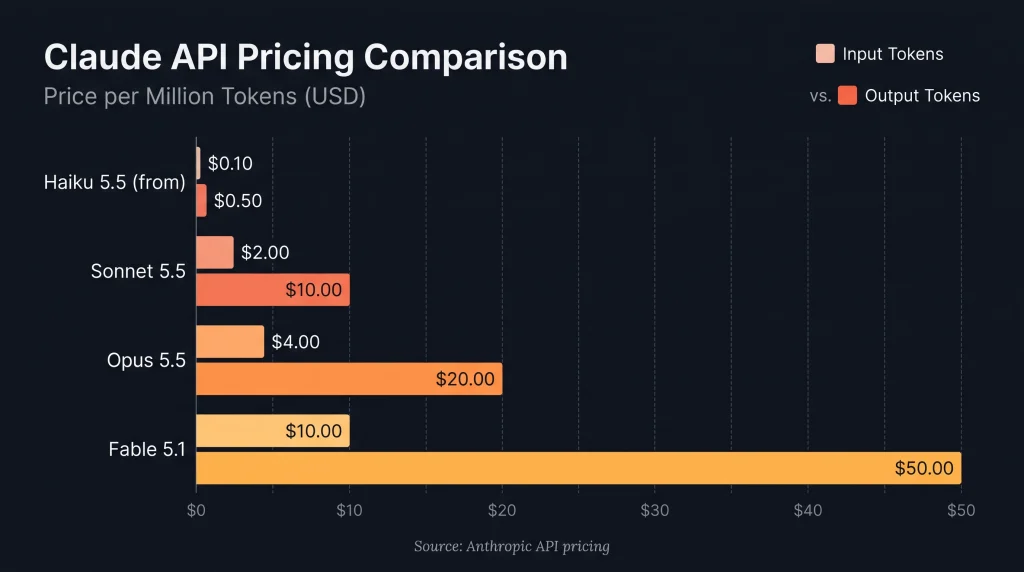
Anthropic’s models page lists four current models with these per-million-token prices:
| Model | API model ID | Latency label | Input price | Output price |
|---|---|---|---|---|
| Claude Haiku 5.5 | claude-haiku-5-5 | Fastest | From $0.10 | From $0.50 |
| Claude Sonnet 5.5 | claude-sonnet-5-5 | Fast | $2 | $10 |
| Claude Opus 5.5 | claude-opus-5-5 | Moderate | $4 | $20 |
| Claude Fable 5.1 | claude-fable-5-1 | Slower | $10 | $50 |
Anthropic recommends Opus 5.5 for most workloads and describes Haiku 5.5 as suited to high-volume, latency-sensitive tasks. Our view for a phone shortcut: start with Haiku 5.5 for translation and short replies, where speed matters. Switch to Sonnet 5.5 or Opus 5.5 for summaries you will act on.
Keeping your API key and messages safe
In our reading, anyone holding the key can send requests on your account, so treat a Claude API iPhone shortcut as a secret.
- Sharing: Apple’s sharing guide does not say whether values typed into actions travel with a shared shortcut. Assume they do. Before sharing, open the shortcut, tap Setup, then Add New Question, and pick the header field that holds your key. Apple says that field is cleared when the shortcut is shared, and the recipient enters their own value.
- Expiry: pick an expiration when you create the key. Anthropic’s errors page lists an expired or revoked key as a cause of 401 errors.
- What leaves your iPhone: the text the shortcut sends, plus your system prompt, goes to Anthropic. Anthropic’s privacy page says it deletes API inputs and outputs on its backend within 30 days. Exceptions include content flagged under its Usage Policy, which can be kept for up to 2 years.
- Large inputs: if a long thread will not send, Apple documents Settings > Shortcuts > Advanced > Allow Sharing Large Amounts of Data for shortcuts that handle large amounts of data.
Why does my Claude shortcut return an error?
The API always returns errors as JSON, with an error object that carries a type and a message. Show that message with Copy to Clipboard while you debug.
| Status and type | What Anthropic says it means | Likely shortcut fix |
|---|---|---|
| 400 invalid_request_error | The format or content of the request is wrong | Remove temperature, top_p or top_k; check the JSON fields |
| 401 authentication_error | The key is malformed, revoked or expired | Re-paste the key after Bearer and a space, or create a new key |
| 402 billing_error | A billing or payment problem | Check payment details or credits in the Console |
| 429 rate_limit_error | A rate limit or spend cap was hit | Wait, and avoid Repeat loops |
| 529 overloaded_error | The API is temporarily overloaded | Run the shortcut again later |
Examples
Because Apple handles native messaging differently from third-party platforms, we’ll look at two practical setups:
- Fully Automated Background Triage for Apple iMessage & SMS.
- One-Tap Quick Triage for WhatsApp (via Share Sheet, Clipboard, or Back Tap).
Architecture: Why We Split This Into Two Automations
iOS enforces strict sandboxing rules that determine how automations run:
| Feature | Apple Messages (SMS/iMessage) | |
| Trigger Mechanism | Native system event (When I get a message) | Share Sheet, Clipboard, or Action Button |
| Execution | 100% zero-tap background execution | Single-tap on demand |
| Data Access | Automatic via Shortcut Input (Sender & Content) | Passed via iOS Share Sheet or Clipboard buffer |
| Outbound Replies | Disabled (Local notification / Reminder only) | Disabled (Local notification / HUD banner only) |
Example 1: Hands-Free iMessage & SMS Triage
In this workflow, your iPhone silently routes every incoming text to Anthropic’s Claude API. Claude reviews the sender and content, tags it as URGENT, MEDIUM, or LOW, and flags your attention only if action is needed.
1. Claude Request Schema (iMessage)
Below is the JSON specification used for the HTTP POST request inside Apple Shortcuts:
{
  "api_endpoint": "https://api.anthropic.com/v1/messages",
  "method": "POST",
  "headers": {
    "x-api-key": "sk-ant-api03-REPLACE_WITH_YOUR_KEY",
    "anthropic-version": "2023-06-01",
    "content-type": "application/json"
  },
  "payload": {
    "model": "claude-3-5-sonnet-latest",
    "max_tokens": 150,
    "temperature": 0.1,
    "system": "You are Nikola's private triage assistant. Auto-reply is strictly DISABLED. Evaluate incoming messages and output ONLY valid raw JSON with keys: \"priority\" (\"URGENT\" | \"MEDIUM\" | \"LOW\"), \"summary\" (one short sentence), and \"action_required\" (true | false).",
    "messages": [
      {
        "role": "user",
        "content": "Sender: [Variable: Shortcut Input / Sender]\nMessage: [Variable: Shortcut Input / Content]"
      }
    ]
  }
}
2. Step-by-Step Shortcuts Setup
- Create the Trigger:
- Open the Shortcuts app and tap the Automation tab (bottom center).
- Tap + and choose Message.
- Leave Sender and Message Contains blank (or restrict to VIP contacts).
- Select Run Immediately and disable Notify When Run.
- Build the API Call:
- Add the Get Contents of URL action.
- Set the URL to
https://api.anthropic.com/v1/messagesand method toPOST. - Add the required headers (
x-api-key,anthropic-version, andcontent-type). - Assemble the JSON body with
model,system, andmessages(injectingShortcut Inputvariables for sender and message body).
- Parse and Filter:
- Add Get Dictionary Value to extract
content.1.text. - Parse that output as a JSON dictionary to read the
priorityandsummarykeys. - Add an If condition:
- If
priorityisURGENT: Trigger Show Notification or add a flagged item to an “Urgent Inquiries” list in Apple Reminders. - Otherwise: Do nothing.
- If
- Add Get Dictionary Value to extract
Example 2: One-Tap WhatsApp Triage Engine
Because WhatsApp runs inside a sandboxed environment, iOS does not permit third-party apps to silently inspect every incoming chat message in the background.
Instead of fighting the operating system, we build an on-demand triage tool accessible anywhere via the Share Sheet, the Action Button, or iOS Back Tap.
1. Claude Request Schema (WhatsApp)
{
  "api_endpoint": "https://api.anthropic.com/v1/messages",
  "method": "POST",
  "headers": {
    "x-api-key": "sk-ant-api03-REPLACE_WITH_YOUR_KEY",
    "anthropic-version": "2023-06-01",
    "content-type": "application/json"
  },
  "payload": {
    "model": "claude-3-5-sonnet-latest",
    "max_tokens": 250,
    "temperature": 0.2,
    "system": "You are a communication triage assistant for Nikola. The input contains a forwarded chat snippet or message. Extract the sender's core intent into 1 sentence and determine priority (\"URGENT\", \"MEDIUM\", or \"LOW\"). Output ONLY valid JSON with keys: \"priority\", \"summary\", and \"deadline_detected\" (string or null).",
    "messages": [
      {
        "role": "user",
        "content": "Analyze this chat text:\n\n[Variable: Shortcut Input or Clipboard]"
      }
    ]
  }
}
2. Step-by-Step Shortcuts Setup
- Create the Shortcut:
- In the Shortcuts tab, tap + in the top right corner.
- Name the shortcut “Triage with Claude”.
- Configure Inputs:
- Tap the (i) details icon at the bottom and toggle on Show in Share Sheet.
- Add an If block at the top:
- If
Shortcut Inputhas any value, useShortcut Input. - Otherwise, add the Get Clipboard action so you can simply
- If
FAQ
Can I use my Claude Pro subscription for the API?
No. Anthropic’s credits page lists Free, Pro and Enterprise plans as not eligible for monthly API credits. Anthropic’s help center describes paid plans and the Console as separate products, so Pro users set up Console billing for the API.
Do I need the anthropic-version 2026-10-21 header?
Anthropic requires an anthropic-version header on every request and gives 2026-10-21 as its example and newest version. Anthropic recommends the latest version whenever possible.
Where should I store my Anthropic API key on iPhone?
Anthropic suggests a safe place such as a secrets manager. In a shortcut, keep it in the header field only, and add an import question to that field before sharing so the key is cleared.
Can Siri read Claude’s reply out loud?
Apple says that when you run a shortcut with Siri, Siri tells you the result after it runs. Name the shortcut something short and easy to say.
Bottom line
Build a Claude API iPhone shortcut if you repeat the same writing job every day. Keep the Claude app for everything else. The API route gives you a saved system prompt, a model of your choice and per-token billing, but it also hands you a secret to protect. Use the 2026-10-21 version, leave temperature out, start on Haiku 5.5, and add the import question before you share. If you already pay for Max, claim the monthly API credits first; on Pro, budget for Console billing.
Sources
- Anthropic, Claude API overview: https://platform.claude.com/docs/en/api
- Anthropic, API versions: https://platform.claude.com/docs/en/api/versioning
- Anthropic, Create a Message (Messages API reference): https://platform.claude.com/docs/en/api/messages/create
- Anthropic, API errors: https://platform.claude.com/docs/en/api/errors
- Anthropic, Get your Claude API key: https://platform.claude.com/docs/en/get-api-key
- Anthropic, Models overview: https://platform.claude.com/docs/en/about-claude/models/overview
- Anthropic, API credits for Max and Team plans: https://platform.claude.com/docs/en/about-claude/api-credits-for-subscribers
- Anthropic, Multilingual support: https://platform.claude.com/docs/en/build-with-claude/multilingual-support
- Anthropic Privacy Center, How long do you store my organization’s data?: https://privacy.claude.com/en/articles/7996866-how-long-do-you-store-my-organization-s-data
- Claude Help Center, Using Claude App Intents, Shortcuts, and Widgets on iOS: https://support.claude.com/en/articles/10263469-using-claude-app-intents-shortcuts-and-widgets-on-ios
- Apple, Request your first API in Shortcuts on iPhone or iPad: https://support.apple.com/guide/shortcuts/apd58d46713f/ios
- Apple, Get Dictionary Value action in Shortcuts: https://support.apple.com/guide/shortcuts/apdf01294032/ios
- Apple, Handling lists in Shortcuts: https://support.apple.com/guide/shortcuts/apd9ba41d21b/ios
- Apple, Launch a shortcut from another app: https://support.apple.com/guide/shortcuts/apd163eb9f95/ios
- Apple, Run shortcuts with the Action button: https://support.apple.com/guide/shortcuts/apdfea15680b/ios
- Apple, Use Siri to run shortcuts: https://support.apple.com/guide/shortcuts/apd07c25bb38/ios
- Apple, Add import questions to shared shortcuts: https://support.apple.com/guide/shortcuts/apdf330fd3a0/ios
- Apple, Share shortcuts on iPhone or iPad: https://support.apple.com/guide/shortcuts/apdf01f8c054/ios
- Apple, API limitations in Shortcuts: https://support.apple.com/guide/shortcuts/apd891a6c84e/ios
- Apple, Adjust basic privacy settings in Shortcuts: https://support.apple.com/guide/shortcuts/apd961a4fc65/ios
- Apple, Use the Ask for Input action: https://support.apple.com/guide/shortcuts/apd68b5c9161/ios
- Apple, About actions in complicated shortcuts: https://support.apple.com/guide/shortcuts/apd081d9d61f/ios