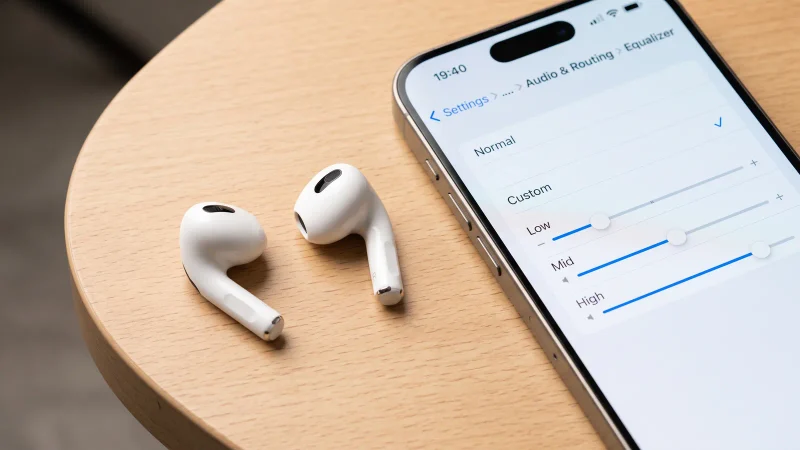
How to Force a Firmware Update on AirPods, Pro, and Max
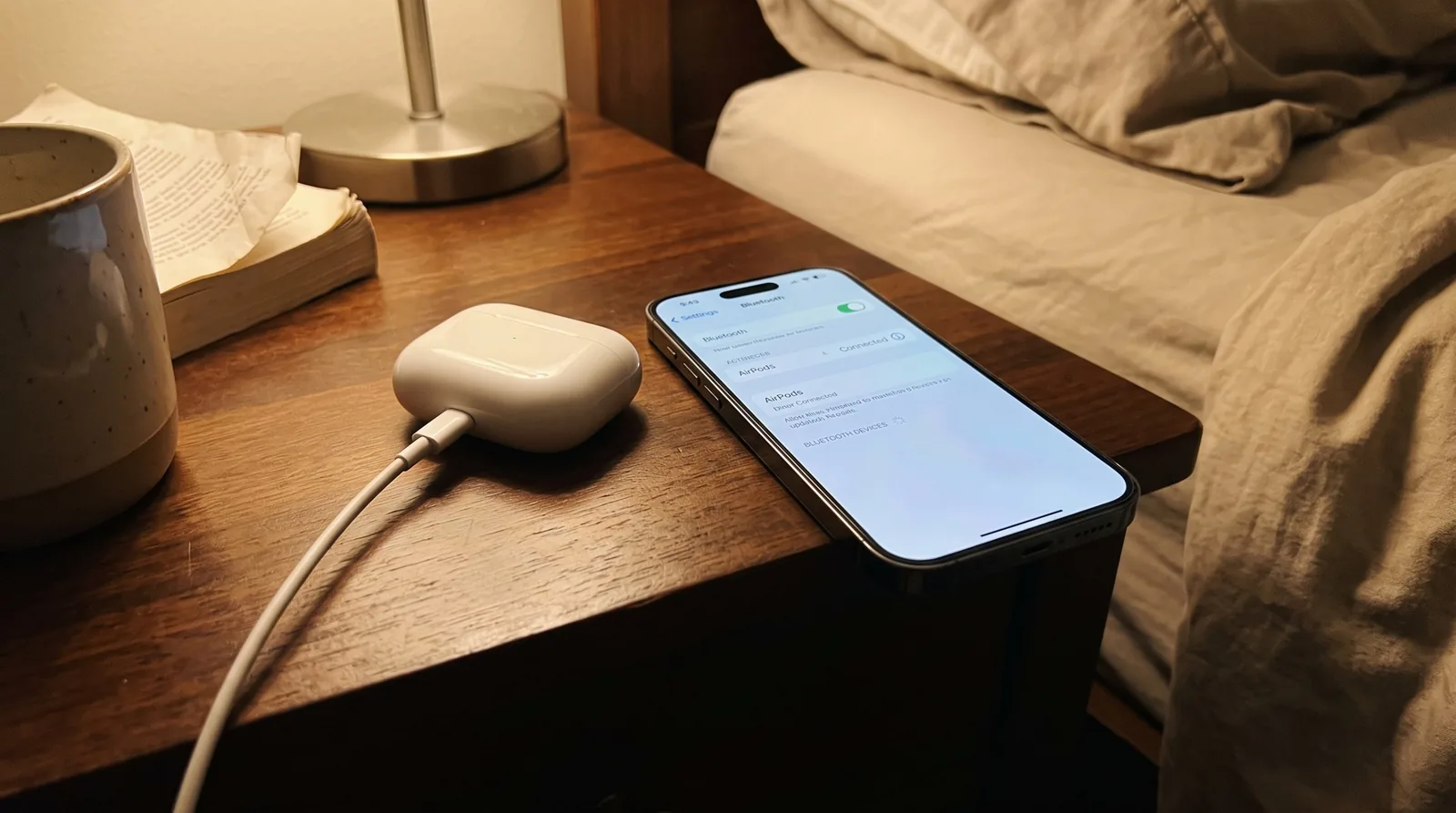
How to force AirPods Firmware Update Not Installing: Fixes by Model
When an AirPods firmware update is not installing, a condition is usually missing: AirPods in the case, the case on power, an iPhone, iPad or Mac on Wi-Fi nearby, and at least 30 minutes of waiting. I found no update button described on Apple’s page. A model already on its newest build has nothing left to install.
Key takeaways
- AirPods receive firmware automatically while they charge in Bluetooth range of a Wi-Fi-connected iPhone, iPad or Mac, so the fix is to create those conditions.
- Apple’s list shows build 9A348 as the newest for AirPods Pro 3, AirPods Pro 2, AirPods 4 and AirPods Max 2, and 9A350 for AirPods 5.
- AirPods 2, AirPods 3 and AirPods Pro 1 all list 6F21, and AirPods 1 lists 6.8.8, so owners of those models may be fully up to date on an old-looking number.
- Apple’s own fallback for a stubborn update is a reset, which also clears your custom settings, so try it last.
- Read your version first: open Settings > Bluetooth and tap the Info button beside your AirPods.
How do AirPods firmware updates actually install?
Apple says firmware updates are delivered automatically while your AirPods are charging and in Bluetooth range of an iPhone, iPad or Mac that is connected to Wi-Fi. That sentence is the whole mechanism. In my reading of Apple’s firmware page, it describes no download prompt, no progress bar and no way to schedule an install.
Three practical consequences follow, and they are my inference rather than Apple’s wording. First, nothing happens while the AirPods sit in your ears or in a bag with the lid open. Second, a case that is not on power will not do the job. Third, an iPhone with Wi-Fi switched off is the same as no host at all.
The checklist later in this guide walks through these in order.
How to check your AirPods firmware version
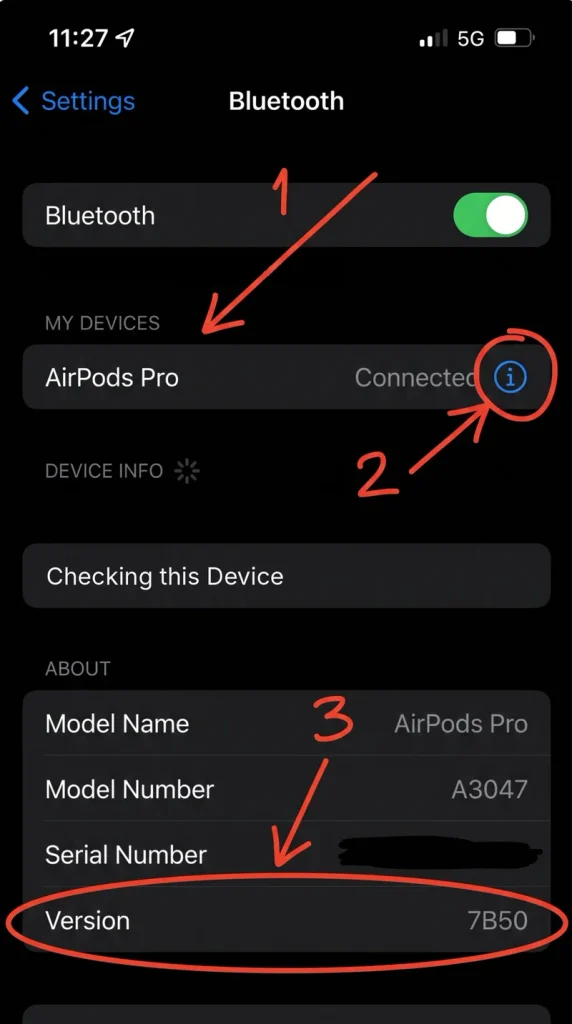
Read the build number before you change anything, because it separates a stuck update from a finished one.
On an iPhone or iPad
- Update the iPhone or iPad to the latest iOS or iPadOS and make sure Bluetooth is on.
- Confirm your AirPods are connected to the device over Bluetooth.
- Open Settings > Bluetooth.
- Tap the Info button next to your AirPods.
- Scroll to the About section. Apple’s page indicates the firmware version appears there.
On a Mac
- Choose the Apple menu, then System Settings.
- Click Bluetooth.
- Click the Info button next to your AirPods.
Write down the string you see. Builds look like 9A348, 6F21 or, for the oldest model, 6.8.8.
What is the newest firmware for each AirPods model?
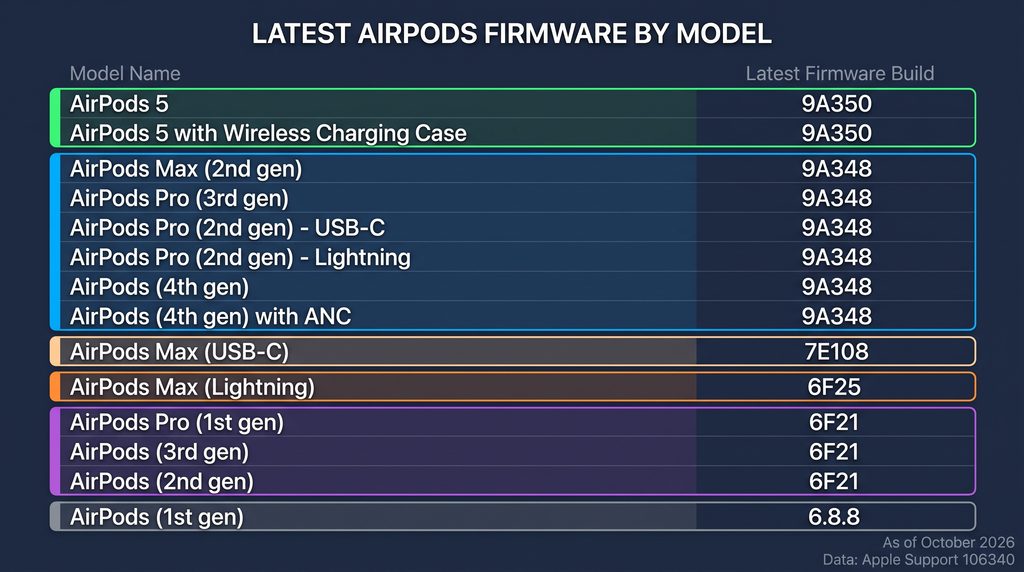
The table shows the latest AirPods firmware version Apple lists for each model, as I read the page on 12 October 2026. Each row stands alone: find your exact model, then compare your number.
| Model | Newest build Apple lists |
|---|---|
| AirPods Pro 3 | 9A348 |
| AirPods Pro 2 with MagSafe Charging Case (USB-C) | 9A348 |
| AirPods Pro 2 with MagSafe Charging Case (Lightning) | 9A348 |
| AirPods Pro 1 | 6F21 |
| AirPods 5 | 9A350 |
| AirPods 4 | 9A348 |
| AirPods 3 | 6F21 |
| AirPods 2 | 6F21 |
| AirPods 1 | 6.8.8 |
| AirPods Max 2 | 9A348 |
| AirPods Max 1 (USB-C) | 7E108 |
| AirPods Max 1 (Lightning) | 6F25 |
Builds change over time, so treat the numbers as a snapshot. If your number differs from your row, the next section helps you tell whether you are behind.
Why some models have nothing to install
Look at the pattern in the table. Four families share 9A348, and AirPods 5 sits one step apart on 9A350. Three older models share 6F21, and the two AirPods Max 1 variants carry their own builds. That grouping is my observation, not an Apple statement about how the software is organised.
Here are three worked examples.
- An AirPods 3 owner reads 6F21. That matches the AirPods 3 row, so the AirPods are current and no amount of waiting will change the number.
- An AirPods Pro 2 owner with a USB-C case reads 7B19. Apple’s row says 9A348, so this pair is behind and worth a proper update attempt.
- An AirPods 4 owner reads 9A348. That matches the AirPods 4 row. Apple ties AirPods 5 firmware 9A350 to the new AirPods 5, so the missing 50 is not a problem.
Which firmware build adds which feature?
Many “my update failed” complaints are really “my new feature is missing” complaints. The feature may depend on your phone’s software rather than on the AirPods build. The table below lists the builds Apple’s page describes, with the software versions Apple names for each.
| Build | Models Apple ties it to | What Apple says it does | Software Apple lists |
|---|---|---|---|
| 9A350 | AirPods 5 | Adds support for the new AirPods 5 | iOS 27 and an Apple Intelligence-enabled iPhone |
| 9A348 | Newest build for AirPods Pro 3, AirPods Pro 2, AirPods 4, AirPods Max 2 | Features a Custom EQ | No minimum listed on the page |
| 8A356 | AirPods Pro 3 | Adds features to support the new AirPods Pro 3 | iPhone running iOS 26 or later, Apple Intelligence-enabled |
| 7E101 | AirPods Max with USB-C | Enables lossless audio and ultra-low latency audio | iOS 18.4, iPadOS 18.4 or macOS Sequoia 15.4 or later |
| 7B19 | AirPods Pro 2 | Enables three new features | iOS 18.1 or iPadOS 18.1 or later |
| 7A294 | AirPods Pro 2 | Makes the hands-free experience more seamless | iOS 18, iPadOS 18, macOS Sequoia or watchOS 11 |
The software column describes the versions on Apple’s page, not a guarantee for every feature in a build. Apple’s wording for 9A350 also ties the AirPods 5 features it describes to an Apple Intelligence-enabled iPhone, which means an older iPhone can hold a current build and still lack the feature.
How to force an AirPods or AirPods Pro firmware update
Apple’s page gives an eight-step routine to force an AirPods firmware update on AirPods and AirPods Pro. These are the steps in plain terms.
- Update your iPhone, iPad or Mac to the latest version of iOS, iPadOS or macOS, and check that Bluetooth is on.
- Confirm your AirPods are connected to that device over Bluetooth.
- Connect the device to Wi-Fi.
- Connect the charging case to power.
- Put the AirPods in the case and close the lid. Keep the lid shut and the AirPods within Bluetooth range of the device.
- Wait at least 30 minutes for the firmware to update.
- Open the case lid so the AirPods reconnect to your device.
- Check the firmware version again.
My suggestion is to run this overnight with the phone on a nightstand, which removes the guesswork about timing.
How to update AirPods Max firmware
AirPods Max follow a different routine. Apple’s page tells you to plug the charging cable into the bottom-right earphone, using Apple’s own word, and the other end into a USB charger or port. The page also has you connect the headphones to an updated device on Wi-Fi and keep them in range for at least 30 minutes. I only had a summary for that last timing, so confirm it on Apple’s page before relying on it.
- Update the iPhone, iPad or Mac, turn on Bluetooth, and join Wi-Fi.
- Connect the AirPods Max to the device.
- Plug the charging cable into the bottom-right earphone and into a USB charger or port.
- Leave them in range for at least 30 minutes.
- Reconnect and check the version again.
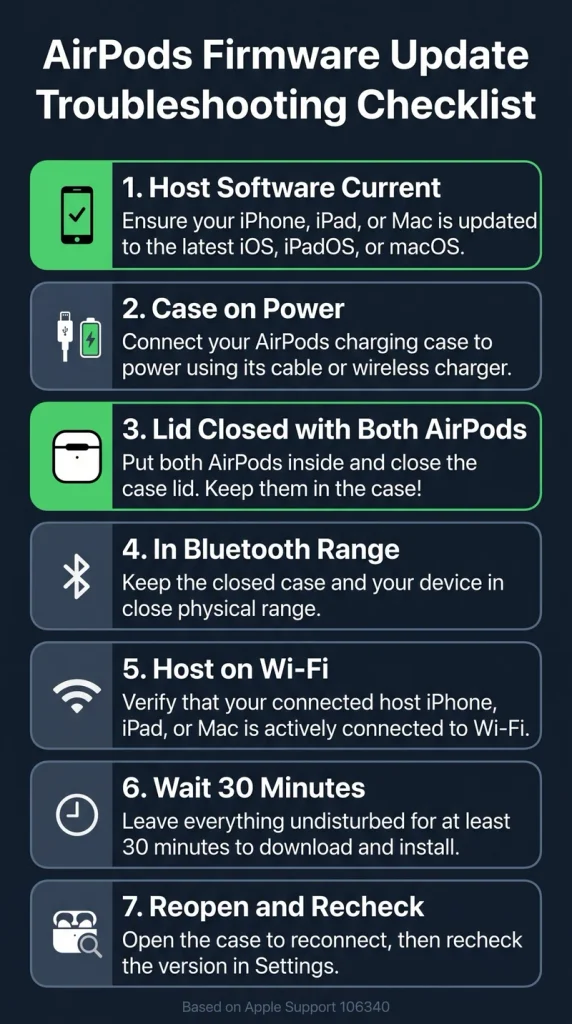
AirPods firmware update not installing: a checklist
Work down this list in order, whether your update seems stuck or never starts. Stop as soon as the version number changes or matches the table.
- Does your number already match the table? If yes, there is nothing to fix.
- Is the case on power? The update is delivered while the AirPods charge, so a flat or unplugged case is the first suspect.
- Are both AirPods inside, with the lid closed? An open lid or a missing earbud breaks the setup Apple describes.
- Is the host device close and on Wi-Fi? Bluetooth range matters, and so does the Wi-Fi connection.
- Is the host’s software current? Step one of Apple’s routine asks for the latest iOS, iPadOS or macOS.
- Did you wait the full 30 minutes? Apple gives that as the minimum. The page I read gives no upper figure.
- Did you reopen the case and reread the version? Apple’s routine has you reopen the lid to reconnect before you check again.
When the number did not change but nothing is wrong
Two situations look like failure and are not. One is a model already on the newest build, such as the 6F21 group. The other is a build that arrived while its feature waits on newer phone software, as the feature table shows.
When to reset your AirPods
Apple’s guidance is blunt: if you still cannot update your firmware, reset your AirPods and try again. I would treat it as a last step for one reason. Apple’s charging support page says that when you reset your AirPods, any custom settings you have made also reset. You lose your tuning, so confirm that the first seven checks failed before you reset.
For AirPods, AirPods Pro 1 and AirPods Pro 2, Apple’s reset guide has you press and hold the setup button on the back of the case for about 15 seconds, until the status light flashes amber and then white. The guide opens by pointing you to the Bluetooth list in Settings, where my summary indicates you remove the AirPods first. For AirPods 4, AirPods 5 and AirPods Pro 3, the guide as I read it uses a double-tap sequence on the front of the case instead, and I could confirm only a summary of the steps.
For AirPods Max, Apple’s reset page says to press and hold the listening mode button and the Digital Crown for 15 seconds, until the LED flashes amber, then white. After any reset, run the update routine again from step one.
What if you have no Apple device nearby?
Apple’s page offers one route: set up an appointment at an Apple Store or with an Apple Authorized Service Provider to have the firmware updated. As I read it, the page names only iPhone, iPad and Mac as update hosts. Apple has not said on that page whether an Android phone or a Windows PC can host an update, so I will not guess.
If you own AirPods but no Apple device, the practical answer is a borrowed iPhone, iPad or Mac for one overnight charge. That is my suggestion and it should work, because it recreates the conditions Apple describes.
Frequently asked questions
Why is my AirPods firmware update not installing?
My reading is that the usual cause is a missing condition: AirPods outside the closed case, a case without power, or no Wi-Fi-connected iPhone, iPad or Mac in range. Check your version against the table first, because some models have no newer build to install.
How do I check my AirPods firmware version?
On an iPhone or iPad, open Settings, tap Bluetooth and tap the Info button next to your AirPods, then look in the About section. On a Mac, open the Apple menu, choose System Settings, click Bluetooth and click the Info button beside your AirPods.
How long does an AirPods firmware update take?
Apple tells you to wait at least 30 minutes with the AirPods in the closed, powered case and in range of a Wi-Fi-connected device. The page I read gives no maximum, so there is no confirmed upper limit.
Does resetting AirPods delete my settings?
Yes. Apple’s support page says that resetting your AirPods also resets any custom settings you have made. Reset only after the normal update routine has failed.
Why do my AirPods 3 show 6F21 with no update available?
Apple lists 6F21 as the newest build for AirPods 3, AirPods 2 and AirPods Pro 1. If your AirPods 3 read 6F21, they are on the newest build Apple lists, so there is nothing further to install.
Verdict: check the number before you touch anything
Do not reset first. Read your build, match it to the row for your exact model, and stop if it already matches. If you are behind, give the AirPods an uninterrupted night in a powered case with a Wi-Fi-connected phone nearby, and reset only after that fails. Expect to redo your custom settings afterwards.